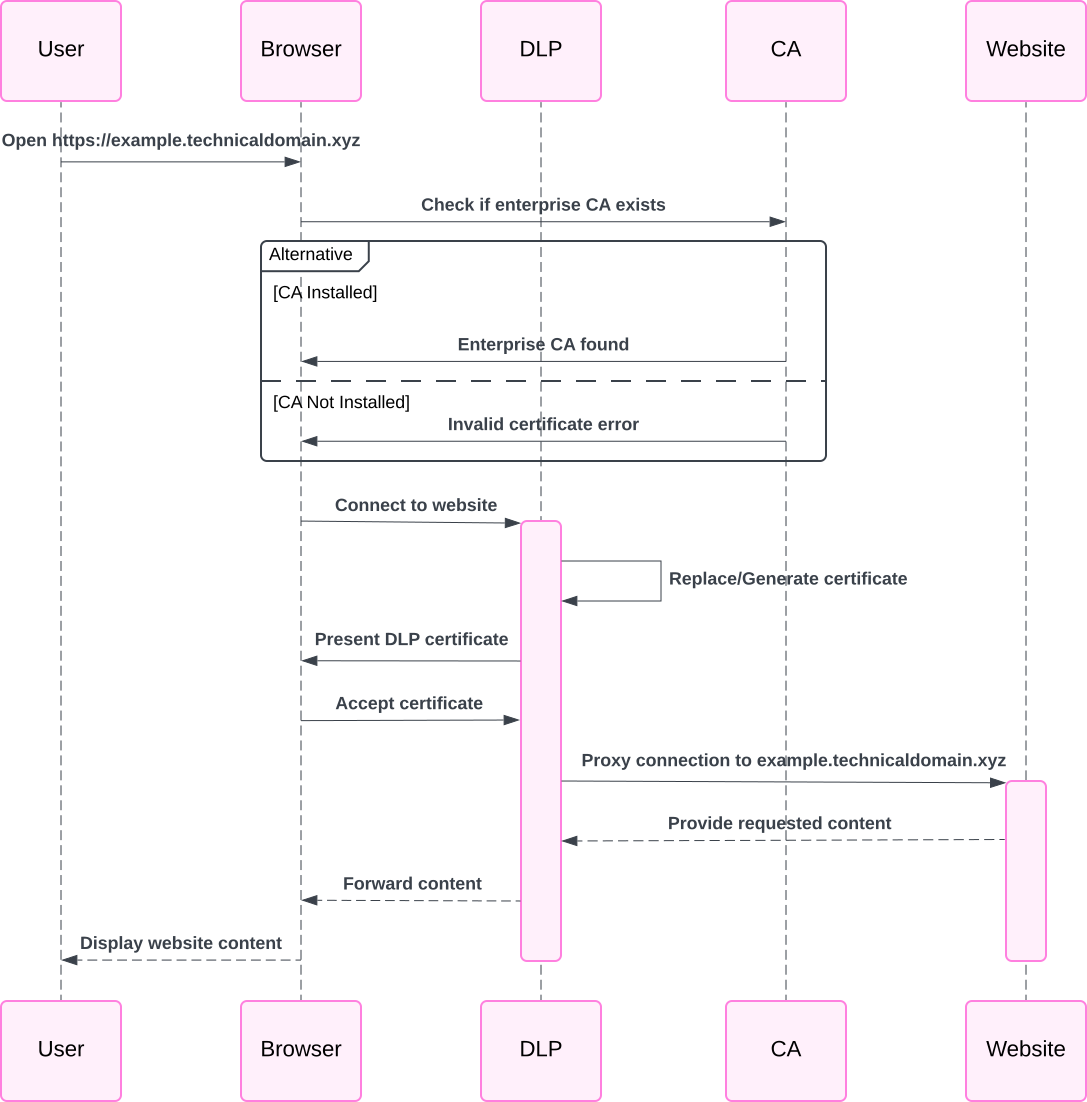
<?xml version="1.0" encoding="utf-8"?>
<feed xmlns="http://www.w3.org/2005/Atom">
  <title>Alexander Kharkevich&#39;s Blog</title>
  
  
  <link href="http://kharkevich.org/atom.xml" rel="self"/>
  
  <link href="http://kharkevich.org/"/>
  <updated>2026-01-20T01:25:27.217Z</updated>
  <id>http://kharkevich.org/</id>
  
  <author>
    <name>Alexander Kharkevich</name>
    
  </author>
  
  <generator uri="https://hexo.io/">Hexo</generator>
  
  <entry>
    <title>Check Webcontent Without Curl or Wget</title>
    <link href="http://kharkevich.org/2026/01/19/check-webcontent-without-curl-wget/"/>
    <id>http://kharkevich.org/2026/01/19/check-webcontent-without-curl-wget/</id>
    <published>2026-01-19T15:00:00.000Z</published>
    <updated>2026-01-20T01:25:27.217Z</updated>
    
    <content type="html"><![CDATA[<link rel="stylesheet" type="text/css" href="/assets/asciinema-player.css" /><script src="/assets/asciinema-player.min.js" type="application/javascript"></script>Sometimes you may find yourself in a minimalistic environment where common tools like `curl` or `wget` are not available to check web content or service health. In such cases, you can use basic shell commands to achieve similar functionality.<span id="more"></span><p>The following example with be alternative to <code>curl http://localhost:8080/health/ready</code> or <code>wget -qO- http://localhost:8080/health/ready</code> using just bash built-in capabilities:</p><figure class="highlight sh"><table><tr><td class="gutter"><pre><span class="line">1</span><br><span class="line">2</span><br><span class="line">3</span><br><span class="line">4</span><br></pre></td><td class="code"><pre><span class="line"><span class="built_in">exec</span> 3&lt;&gt;/dev/tcp/localhost/8080</span><br><span class="line"><span class="built_in">echo</span> -e <span class="string">&quot;GET /health/ready HTTP/1.1\r\nHost: localhost\r\nConnection: close\r\n\r\n&quot;</span> &gt;&amp;3</span><br><span class="line"><span class="built_in">cat</span> &lt;&amp;3</span><br><span class="line"><span class="built_in">exec</span> 3&gt;&amp;-</span><br></pre></td></tr></table></figure>]]></content>
    
    
    <summary type="html">&lt;link rel=&quot;stylesheet&quot; type=&quot;text/css&quot; href=&quot;/assets/asciinema-player.css&quot; /&gt;&lt;script src=&quot;/assets/asciinema-player.min.js&quot; type=&quot;application/javascript&quot;&gt;&lt;/script&gt;
Sometimes you may find yourself in a minimalistic environment where common tools like `curl` or `wget` are not available to check web content or service health. In such cases, you can use basic shell commands to achieve similar functionality.</summary>


    <category term="curl" scheme="http://kharkevich.org/tags/curl/"/>
    
    <category term="wget" scheme="http://kharkevich.org/tags/wget/"/>
    
    <category term="echo" scheme="http://kharkevich.org/tags/echo/"/>
    
    <category term="bash" scheme="http://kharkevich.org/tags/bash/"/>
    
  </entry>
  
  <entry>
    <title>How to fix Terminal Integration Freezing in AI-enabled IDEs (kiro, vscode)?</title>
    <link href="http://kharkevich.org/2025/09/06/terminal-integration-freezing-in-ai-ide/"/>
    <id>http://kharkevich.org/2025/09/06/terminal-integration-freezing-in-ai-ide/</id>
    <published>2025-09-06T14:00:00.000Z</published>
    <updated>2026-01-20T01:25:27.221Z</updated>
    
    <content type="html"><![CDATA[<link rel="stylesheet" type="text/css" href="/assets/asciinema-player.css" /><script src="/assets/asciinema-player.min.js" type="application/javascript"></script>If you're using an AI-enabled IDE like VSCode with the Copilot extension, Kiro IDE, or even Cursor, you might have noticed that the integrated terminal, which is used for some fully automated cases, doesn't always work properly. Command execution looks fine, but the agent doesn't get output from the terminal.<span id="more"></span><h2 id="Why-do-we-need-terminal-integration"><a href="#Why-do-we-need-terminal-integration" class="headerlink" title="Why do we need terminal integration?"></a>Why do we need terminal integration?</h2><p>Most AI-enabled IDEs use terminal integration to run commands and get the output back in the IDE. This is useful for fully automated tasks, such as running tests, building projects, and more. In some cases, you can do this manually in an external terminal, but you will lose some of the IDE’s automation capabilities.</p><h2 id="Be-aware"><a href="#Be-aware" class="headerlink" title="Be aware!"></a>Be aware!</h2><p>Blindly trusting AI is dangerous! There have already been cases where AI followed malicious instructions and caused harm. Always check the list of allowed commands for automatic execution, and try to run your IDE in a sandbox to prevent access to unrelated data.</p><h2 id="Why-can-terminal-integration-freeze"><a href="#Why-can-terminal-integration-freeze" class="headerlink" title="Why can terminal integration freeze?"></a>Why can terminal integration freeze?</h2><p>In most cases, the problem is that using complicated and slow zsh themes (like oh-my-zsh with powerlevel10k) makes the terminal startup too slow, causing the IDE’s terminal integration to time out while waiting for the shell to be ready. Additionally, some themes use special characters that are not properly handled by the IDE terminal.</p><h2 id="How-to-fix-it"><a href="#How-to-fix-it" class="headerlink" title="How to fix it?"></a>How to fix it?</h2><p><strong>Disable the theme</strong>. You can do this by editing your <code>~/.zshrc</code> file and setting the theme to empty (“”), which will disable it and improve terminal startup time.</p><figure class="highlight sh"><table><tr><td class="gutter"><pre><span class="line">1</span><br><span class="line">2</span><br><span class="line">3</span><br><span class="line">4</span><br><span class="line">5</span><br></pre></td><td class="code"><pre><span class="line"><span class="keyword">if</span> [[ <span class="string">&quot;<span class="variable">$TERM_PROGRAM</span>&quot;</span> == <span class="string">&quot;kiro&quot;</span> || <span class="string">&quot;<span class="variable">$TERM_PROGRAM</span>&quot;</span> == <span class="string">&quot;vscode&quot;</span> ]]; <span class="keyword">then</span></span><br><span class="line">  ZSH_THEME=<span class="string">&quot;&quot;</span> <span class="comment"># disable theme for Kiro and VSCode terminals</span></span><br><span class="line"><span class="keyword">else</span></span><br><span class="line">  ZSH_THEME=<span class="string">&quot;powerlevel10k/powerlevel10k&quot;</span></span><br><span class="line"><span class="keyword">fi</span></span><br></pre></td></tr></table></figure><p>This code checks if the terminal is running inside Kiro or VSCode, and if so, it disables the theme. Otherwise, it uses the powerlevel10k theme.</p>]]></content>
    
    
    <summary type="html">&lt;link rel=&quot;stylesheet&quot; type=&quot;text/css&quot; href=&quot;/assets/asciinema-player.css&quot; /&gt;&lt;script src=&quot;/assets/asciinema-player.min.js&quot; type=&quot;application/javascript&quot;&gt;&lt;/script&gt;
If you&#39;re using an AI-enabled IDE like VSCode with the Copilot extension, Kiro IDE, or even Cursor, you might have noticed that the integrated terminal, which is used for some fully automated cases, doesn&#39;t always work properly. Command execution looks fine, but the agent doesn&#39;t get output from the terminal.</summary>


    <category term="ZSH" scheme="http://kharkevich.org/tags/ZSH/"/>
    
    <category term="AI" scheme="http://kharkevich.org/tags/AI/"/>
    
    <category term="IDE" scheme="http://kharkevich.org/tags/IDE/"/>
    
    <category term="Terminal" scheme="http://kharkevich.org/tags/Terminal/"/>
    
    <category term="VSCode" scheme="http://kharkevich.org/tags/VSCode/"/>
    
    <category term="Kiro" scheme="http://kharkevich.org/tags/Kiro/"/>
    
  </entry>
  
  <entry>
    <title>What is BIMI?</title>
    <link href="http://kharkevich.org/2025/07/22/what-is-bimi/"/>
    <id>http://kharkevich.org/2025/07/22/what-is-bimi/</id>
    <published>2025-07-22T14:00:00.000Z</published>
    <updated>2026-01-20T01:25:27.221Z</updated>
    
    <content type="html"><![CDATA[<link rel="stylesheet" type="text/css" href="/assets/asciinema-player.css" /><script src="/assets/asciinema-player.min.js" type="application/javascript"></script>Have you ever wondered how some email senders manage to display their brand logos right next to their emails in your inbox? That's BIMI in action - Brand Indicators for Message Identification, pronounced "Bih-mee". It's an emerging email specification that allows organizations to display their brand-controlled logos within supporting email clients, but only after passing strict authentication checks.<span id="more"></span><h2 id="TL-DR"><a href="#TL-DR" class="headerlink" title="TL;DR"></a>TL;DR</h2><ul><li>You need DMARC enforcement to use BIMI</li><li>BIMI requires a specific SVG logo format</li><li>BIMI requires a Verified Mark Certificate (VMC) or Common Mark Certificate (CMC) to display logos</li><li>You need to publish a DNS record with your logo URL and optionally (but in practice, required for most providers) a VMC URL</li></ul><p>You can check your BIMI implementation using tools like the <a href="https://bimivalidator.authmilter.org/">BIMI Validator</a>.</p><p>Certificates are required for displaying logos, which can be expensive (around $1,000-$1,500 per year). Let’s Encrypt does not provide VMCs due to their manual verification requirements. </p><p>No fun here.</p><h2 id="How-BIMI-Works"><a href="#How-BIMI-Works" class="headerlink" title="How BIMI Works"></a>How BIMI Works</h2><p>The magic happens through a combination of DNS records and email authentication protocols:</p><ol><li><strong>Email Authentication Foundation</strong>: BIMI builds upon SPF (Sender Policy Framework), DKIM (DomainKeys Identified Mail), and DMARC protocols</li><li><strong>DNS Record Publishing</strong>: Organizations publish a new standardized DNS record containing a URL to their logo</li><li><strong>DMARC Enforcement</strong>: The mailbox provider checks that the sending domain has a DMARC policy configured with enforcement (<code>p=quarantine</code> or <code>p=reject</code>)</li><li><strong>Logo Display</strong>: If both checks are successful, supporting mailbox providers may display the logo from the BIMI record</li></ol><p>The process ensures that only legitimate, authenticated emails can display brand logos, making it harder for attackers to impersonate trusted brands.</p><h2 id="How-to-Make-Your-Own-BIMI"><a href="#How-to-Make-Your-Own-BIMI" class="headerlink" title="How to Make Your Own BIMI"></a>How to Make Your Own BIMI</h2><p>Implementing BIMI for your organization involves several steps:</p><h3 id="Prerequisites"><a href="#Prerequisites" class="headerlink" title="Prerequisites"></a>Prerequisites</h3><ol><li><strong>DMARC Enforcement</strong>: Your domain must have a DMARC policy of at least <code>p=quarantine</code> or <code>p=reject</code></li><li><strong>Logo Ownership</strong>: You must own the trademark&#x2F;rights to the logo you want to display (for VMC), otherwise you can use a Common Mark Certificate (CMC), which is somewhat easier to obtain but still costly</li><li><strong>SVG Logo</strong>: Your logo must be in SVG with specific requirements</li></ol><h3 id="Step-by-Step-Implementation"><a href="#Step-by-Step-Implementation" class="headerlink" title="Step-by-Step Implementation"></a>Step-by-Step Implementation</h3><ol><li><p><strong>Prepare Your Logo</strong>:</p><ul><li>Create an SVG file using the SVG Tiny PS profile</li><li>Make it square with a solid background color</li><li>Ensure it displays well in a circle (some email clients crop it)</li><li>Host it on HTTPS with proper CORS headers</li></ul></li><li><p><strong>Create the BIMI DNS Record</strong>:</p><figure class="highlight plaintext"><table><tr><td class="gutter"><pre><span class="line">1</span><br></pre></td><td class="code"><pre><span class="line">default._bimi.technicaldomain.xyz IN TXT &quot;v=BIMI1; l=https://technicaldomain.xyz/logo.svg;&quot;</span><br></pre></td></tr></table></figure></li><li><p><strong>Test Your Implementation</strong>:<br>Use tools like the <a href="https://bimivalidator.authmilter.org/">BIMI Validator</a> to verify your setup</p></li></ol><h3 id="BIMI-Record-Attributes"><a href="#BIMI-Record-Attributes" class="headerlink" title="BIMI Record Attributes"></a>BIMI Record Attributes</h3><ul><li><code>v=BIMI1</code>: Indicates this is a BIMI record</li><li><code>l=URL</code>: The hosting location of the SVG image</li><li><code>a=URL</code>: The hosting location of the VMC (Verified Mark Certificate) - optional but recommended, without it the logo will not be displayed in some email clients (for example Apple Mail will not display the logo without a VMC)</li></ul><h2 id="Certificates-and-BIMI"><a href="#Certificates-and-BIMI" class="headerlink" title="Certificates and BIMI"></a>Certificates and BIMI</h2><p>This is where things get expensive. While you can implement basic BIMI without certificates, many major email providers require Verified Mark Certificates (VMCs) to actually display logos.</p><h3 id="Paid-VMC-Options"><a href="#Paid-VMC-Options" class="headerlink" title="Paid VMC Options"></a>Paid VMC Options</h3><p>Currently, only several Certificate Authorities offer <a href="https://bimigroup.org/vmc-issuers/">VMCs</a>: DigiCert, GlobalSign and SSL.com</p><p><strong>Cost</strong>: VMCs typically cost <strong>$1,000-$1,500 per year</strong> - a significant investment just to display a logo in emails.</p><h3 id="The-Let’s-Encrypt-Discussion"><a href="#The-Let’s-Encrypt-Discussion" class="headerlink" title="The Let’s Encrypt Discussion"></a>The Let’s Encrypt Discussion</h3><p>Unfortunately, Let’s Encrypt cannot and will not offer VMCs. As discussed in their community forums, VMCs require manual verification of trademark ownership, which goes against Let’s Encrypt’s automated certificate issuance model. A Let’s Encrypt staff member confirmed: <a href="https://community.letsencrypt.org/t/brand-indicators-for-message-identification-bimi-and-vmc-implementation/207009/3">“Because of the manual verification required for VMC, Let’s Encrypt cannot implement it. I suspect there will never be a free or low cost option.”</a></p><p>This creates a significant barrier to BIMI adoption, especially for smaller organizations that can’t justify the annual expense.</p><h2 id="Benefits-of-Using-BIMI"><a href="#Benefits-of-Using-BIMI" class="headerlink" title="Benefits of Using BIMI"></a>Benefits of Using BIMI</h2><h3 id="For-Organizations"><a href="#For-Organizations" class="headerlink" title="For Organizations"></a>For Organizations</h3><ul><li><strong>Brand Recognition</strong>: Your logo appears next to authenticated emails</li><li><strong>Enhanced Trust</strong>: Recipients can visually identify legitimate emails</li><li><strong>Professional Appearance</strong>: Emails look more polished and trustworthy</li></ul><h3 id="For-Email-Recipients"><a href="#For-Email-Recipients" class="headerlink" title="For Email Recipients"></a>For Email Recipients</h3><ul><li><strong>Visual Authentication</strong>: Quick visual confirmation of sender legitimacy</li><li><strong>Reduced Phishing Risk</strong>: Harder for scammers to fake branded emails</li><li><strong>Better User Experience</strong>: Easier to identify important emails</li></ul><h2 id="Real-World-Examples"><a href="#Real-World-Examples" class="headerlink" title="Real-World Examples"></a>Real-World Examples</h2><p>Several major organizations use BIMI successfully:</p><ul><li><strong>amazon.ca</strong>: Amazon Canada displays their logo in supported email clients</li><li><strong>m.wealthsimple.com</strong>: The financial services company uses BIMI for brand recognition</li><li><strong>skipthedishes.com</strong>: The food delivery service leverages BIMI for order confirmations</li></ul><h3 id="How-to-Check-BIMI-Implementation"><a href="#How-to-Check-BIMI-Implementation" class="headerlink" title="How to Check BIMI Implementation"></a>How to Check BIMI Implementation</h3><p>You can verify BIMI records using command-line tools:</p><figure class="highlight bash"><table><tr><td class="gutter"><pre><span class="line">1</span><br><span class="line">2</span><br></pre></td><td class="code"><pre><span class="line"><span class="comment"># Check for BIMI DNS record</span></span><br><span class="line">dig TXT default._bimi.technicaldomain.xyz</span><br></pre></td></tr></table></figure><p>You will see a response like this if BIMI is implemented:</p><figure class="highlight bash"><table><tr><td class="gutter"><pre><span class="line">1</span><br><span class="line">2</span><br><span class="line">3</span><br><span class="line">4</span><br><span class="line">5</span><br><span class="line">6</span><br><span class="line">7</span><br><span class="line">8</span><br><span class="line">9</span><br><span class="line">10</span><br><span class="line">11</span><br><span class="line">12</span><br><span class="line">13</span><br></pre></td><td class="code"><pre><span class="line">; &lt;&lt;&gt;&gt; DiG 9.10.6 &lt;&lt;&gt;&gt; TXT default._bimi.technicaldomain.xyz</span><br><span class="line">;; global options: +cmd</span><br><span class="line">;; Got answer:</span><br><span class="line">;; -&gt;&gt;HEADER&lt;&lt;- <span class="string">opcode: QUERY, status: NOERROR, id: 42410</span></span><br><span class="line"><span class="string">;; flags: qr rd ra; QUERY: 1, ANSWER: 1, AUTHORITY: 0, ADDITIONAL: 1</span></span><br><span class="line"><span class="string"></span></span><br><span class="line"><span class="string">;; OPT PSEUDOSECTION:</span></span><br><span class="line"><span class="string">; EDNS: version: 0, flags:; udp: 1220</span></span><br><span class="line"><span class="string">;; QUESTION SECTION:</span></span><br><span class="line"><span class="string">;default._bimi.technicaldomain.xyz. INTXT</span></span><br><span class="line"><span class="string"></span></span><br><span class="line"><span class="string">;; ANSWER SECTION:</span></span><br><span class="line"><span class="string">default._bimi.technicaldomain.xyz. 300 INTXT&quot;v=BIMI1;l=https://technicaldomain.xyz/logo.svg;a=https://technicaldomain.xyz/certchain.pem&quot;</span></span><br></pre></td></tr></table></figure><figure class="highlight bash"><table><tr><td class="gutter"><pre><span class="line">1</span><br><span class="line">2</span><br><span class="line">3</span><br><span class="line">4</span><br><span class="line">5</span><br></pre></td><td class="code"><pre><span class="line"><span class="comment"># Download and inspect the logo</span></span><br><span class="line">curl -s https://technicaldomain.xyz/logo.svg</span><br><span class="line"></span><br><span class="line"><span class="comment"># If there&#x27;s a VMC, inspect the certificate</span></span><br><span class="line">curl -s https://technicaldomain.xyz/certchain.pem | openssl x509 -text -noout</span><br></pre></td></tr></table></figure><p>For a complete verification, you can use the BIMI validator at <code>bimivalidator.authmilter.org</code>.</p><h2 id="Mailbox-Provider-Support-at-the-time-of-writing"><a href="#Mailbox-Provider-Support-at-the-time-of-writing" class="headerlink" title="Mailbox Provider Support (at the time of writing)"></a>Mailbox Provider Support (at the time of writing)</h2><p>BIMI support varies significantly across email providers:</p><p><strong>Full Support with VMC requirement</strong>:</p><ul><li>Gmail (Google Workspace)</li><li>Apple Mail</li></ul><p><strong>Self-asserted BIMI Support</strong> (no VMC required):</p><ul><li>Yahoo</li><li>Some other providers</li></ul><p><strong>Growing Support</strong>:</p><ul><li>Fastmail</li><li>La Poste</li><li>Onet Poczta</li><li>Zone</li></ul><p><strong>No Support</strong>:</p><ul><li>Microsoft Outlook</li></ul><p>The inconsistent support means your investment might not pay off across all email clients. Especially if your organization relies heavily on Microsoft Outlook, which currently does not support BIMI at all.</p><h2 id="Conclusion"><a href="#Conclusion" class="headerlink" title="Conclusion"></a>Conclusion</h2><p>BIMI is an interesting technology that bridges email authentication and brand recognition. It’s somewhat amusing that we’ve reached a point where displaying a simple logo in email requires complex certificate infrastructure and significant annual costs.</p><p><strong>The Reality Check</strong>:</p><ul><li><strong>For Large Brands&#x2F;Banks</strong>: BIMI makes sense if budget allows and brand protection is critical</li><li><strong>For SMBs</strong>: The $1,000+ annual cost is hard to justify for logo display</li><li><strong>For Everyone</strong>: Limited mailbox provider support reduces the return on investment</li></ul><p>If you’re considering BIMI, focus first on solid email authentication (SPF, DKIM, DMARC) - these provide real security benefits. BIMI is the cherry on top, not the foundation of email security.</p><p><strong>Bottom Line</strong>: Funny concept, makes some sense for brands with deep pockets, but costly implementation and patchy mailbox provider support limit its practical appeal.</p><p>But if you’re banking on email as a key marketing channel, the investment in BIMI could pay off in increased brand trust and recognition.</p><p>Evaluate your needs and budget before investing in BIMI.</p>]]></content>
    
    
    <summary type="html">&lt;link rel=&quot;stylesheet&quot; type=&quot;text/css&quot; href=&quot;/assets/asciinema-player.css&quot; /&gt;&lt;script src=&quot;/assets/asciinema-player.min.js&quot; type=&quot;application/javascript&quot;&gt;&lt;/script&gt;
Have you ever wondered how some email senders manage to display their brand logos right next to their emails in your inbox? That&#39;s BIMI in action - Brand Indicators for Message Identification, pronounced &quot;Bih-mee&quot;. It&#39;s an emerging email specification that allows organizations to display their brand-controlled logos within supporting email clients, but only after passing strict authentication checks.</summary>


    <category term="DNS" scheme="http://kharkevich.org/tags/DNS/"/>
    
    <category term="BIMI" scheme="http://kharkevich.org/tags/BIMI/"/>
    
    <category term="Email" scheme="http://kharkevich.org/tags/Email/"/>
    
    <category term="Security" scheme="http://kharkevich.org/tags/Security/"/>
    
  </entry>
  
  <entry>
    <title>Flush DNS Cache</title>
    <link href="http://kharkevich.org/2025/05/24/flush-dns-cache/"/>
    <id>http://kharkevich.org/2025/05/24/flush-dns-cache/</id>
    <published>2025-05-24T14:00:00.000Z</published>
    <updated>2026-01-20T01:25:27.218Z</updated>
    
    <content type="html"><![CDATA[<link rel="stylesheet" type="text/css" href="/assets/asciinema-player.css" /><script src="/assets/asciinema-player.min.js" type="application/javascript"></script>How to clear the DNS cache on Windows, macOS, and Linux.<span id="more"></span><h3 id="macOS"><a href="#macOS" class="headerlink" title="macOS"></a>macOS</h3><p>Run the following command in the terminal:</p><figure class="highlight sh"><table><tr><td class="gutter"><pre><span class="line">1</span><br></pre></td><td class="code"><pre><span class="line"><span class="built_in">sudo</span> dscacheutil -flushcache; <span class="built_in">sudo</span> killall -HUP mDNSResponder</span><br></pre></td></tr></table></figure><h3 id="Windows"><a href="#Windows" class="headerlink" title="Windows"></a>Windows</h3><p>Run the following command in the Command Prompt with administrator privileges:</p><figure class="highlight sh"><table><tr><td class="gutter"><pre><span class="line">1</span><br></pre></td><td class="code"><pre><span class="line">ipconfig /flushdns</span><br></pre></td></tr></table></figure><h3 id="Linux"><a href="#Linux" class="headerlink" title="Linux"></a>Linux</h3><p>For systems using systemd, run the following command in the terminal:</p><figure class="highlight sh"><table><tr><td class="gutter"><pre><span class="line">1</span><br></pre></td><td class="code"><pre><span class="line"><span class="built_in">sudo</span> resolvectl flush-caches</span><br></pre></td></tr></table></figure><p>Alternatively, you can restart the service:</p><figure class="highlight sh"><table><tr><td class="gutter"><pre><span class="line">1</span><br></pre></td><td class="code"><pre><span class="line"><span class="built_in">sudo</span> systemctl restart systemd-resolved</span><br></pre></td></tr></table></figure><p>The end.</p>]]></content>
    
    
    <summary type="html">&lt;link rel=&quot;stylesheet&quot; type=&quot;text/css&quot; href=&quot;/assets/asciinema-player.css&quot; /&gt;&lt;script src=&quot;/assets/asciinema-player.min.js&quot; type=&quot;application/javascript&quot;&gt;&lt;/script&gt;
How to clear the DNS cache on Windows, macOS, and Linux.</summary>


    <category term="DNS" scheme="http://kharkevich.org/tags/DNS/"/>
    
    <category term="tips&amp;tricks" scheme="http://kharkevich.org/tags/tips-tricks/"/>
    
    <category term="macos" scheme="http://kharkevich.org/tags/macos/"/>
    
  </entry>
  
  <entry>
    <title>Expose Amazon MSK with Custom FQDN Name and TLS Certificate from Private Subnet to the Internet</title>
    <link href="http://kharkevich.org/2025/04/15/expose-msk-from-private-subnet/"/>
    <id>http://kharkevich.org/2025/04/15/expose-msk-from-private-subnet/</id>
    <published>2025-04-15T14:00:00.000Z</published>
    <updated>2026-01-20T01:25:27.218Z</updated>
    
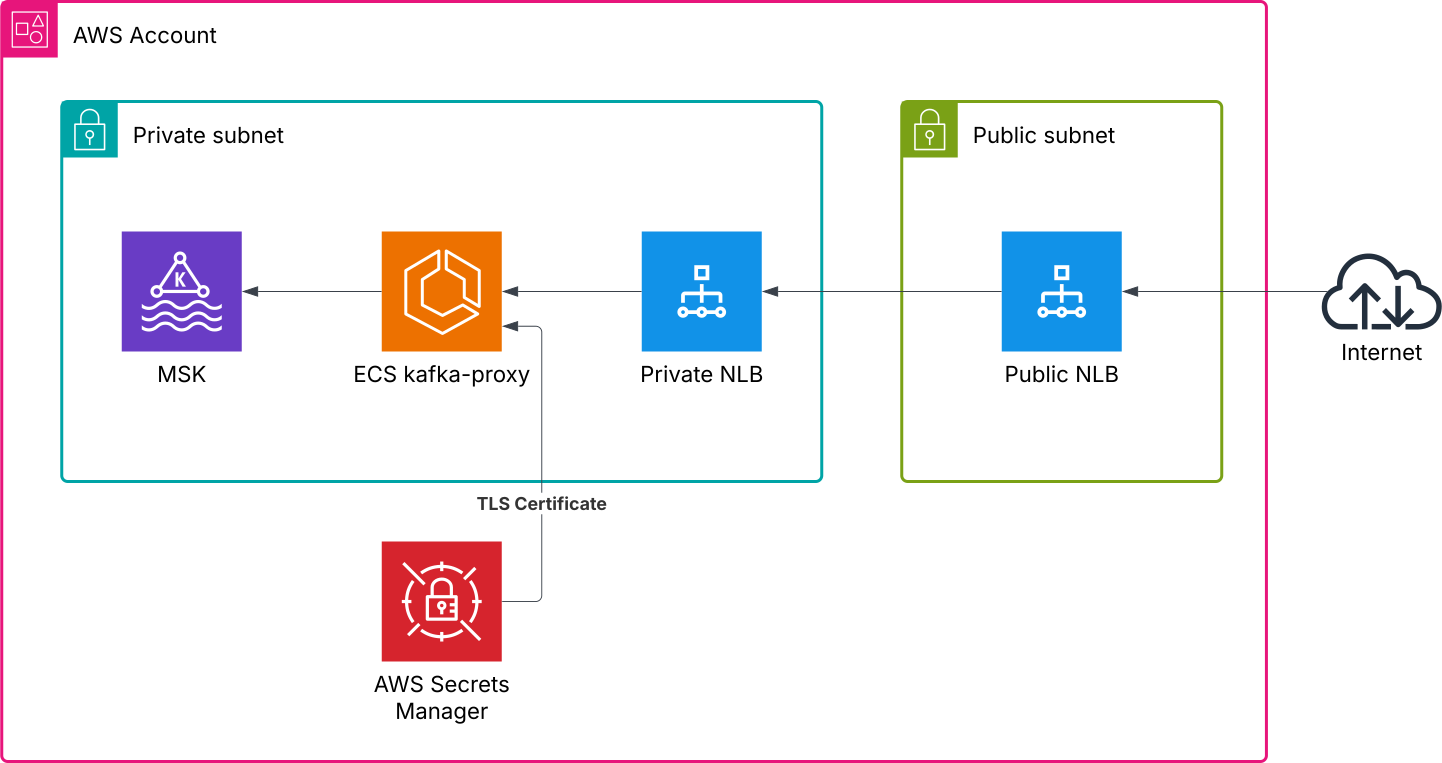
    <content type="html"><![CDATA[<link rel="stylesheet" type="text/css" href="/assets/asciinema-player.css" /><script src="/assets/asciinema-player.min.js" type="application/javascript"></script>Amazon MSK makes it easy to run Apache Kafka clusters on AWS. Sometimes you need to expose MSK to external clients. Deploying it in a public subnet is the most common case to achieve this. However, in some cases, you need to keep your MSK in a private subnet or expose MSK with your custom domain name.<span id="more"></span><h2 id="TL-DR"><a href="#TL-DR" class="headerlink" title="TL;DR"></a>TL;DR</h2><p>You need to set up <a href="https://github.com/grepplabs/kafka-proxy">kafka-proxy</a> with custom configuration and a custom TLS certificate, then expose it via a Network Load Balancer.</p><p>AWS Blog references:</p><ul><li><a href="https://aws.amazon.com/blogs/big-data/secure-connectivity-patterns-to-access-amazon-msk-across-aws-regions/">Secure connectivity patterns to access Amazon MSK across AWS Regions</a></li><li><a href="https://aws.amazon.com/blogs/big-data/connect-kafka-client-applications-securely-to-your-amazon-msk-cluster-from-different-vpcs-and-aws-accounts/">Connect Kafka client applications securely to your Amazon MSK cluster from different VPCs and AWS accounts</a></li></ul><h2 id="Use-Cases"><a href="#Use-Cases" class="headerlink" title="Use Cases"></a>Use Cases</h2><p>Exposing Amazon MSK from a private subnet with a custom FQDN and TLS certificate is useful in the following scenarios:</p><ol><li><strong>Multi-Region Deployments</strong>: When you need to connect clients from different AWS regions to your MSK cluster securely.</li><li><strong>Hybrid Cloud Environments</strong>: When external clients or on-premises systems need access to your MSK cluster without exposing it directly to the public internet.</li><li><strong>Compliance Requirements</strong>: When your organization mandates the use of private subnets and custom domain names for secure communication.</li><li><strong>Custom Domain Branding</strong>: When you want to use a custom FQDN for branding or easier client configuration.</li></ol><h2 id="High-Level-Design"><a href="#High-Level-Design" class="headerlink" title="High-Level Design"></a>High-Level Design</h2><p><img src="/2025/04/15/expose-msk-from-private-subnet/expose-msk-from-private-subnet.svg" alt="HLD diagram"></p><p>The following assumptions are presented here:</p><ul><li>Amazon MSK is deployed in a private subnet. No extra steps in configuration are made.</li><li>TLS certificate and private key are already stored in AWS Secrets Manager.</li><li>Certificate Manager is not used in this case because we need to retrieve the private key.</li><li>NLB TLS listener is not used in this case because we need to replace not only the certificate but also update Kafka listeners’ FQDN, and kafka-proxy does all this job for us.</li><li>Appropriate IAM roles are already configured to provide access to necessary resources.</li><li>Security groups configuration is out of scope.</li></ul><h2 id="Step-by-Step"><a href="#Step-by-Step" class="headerlink" title="Step by Step"></a>Step by Step</h2><h3 id="Precondition"><a href="#Precondition" class="headerlink" title="Precondition"></a>Precondition</h3><p>VPC is configured, and you have enough unused IP addresses in your private VPC to run MSK, ECS, and NLB.</p><h3 id="Certificates"><a href="#Certificates" class="headerlink" title="Certificates"></a>Certificates</h3><p>Put your certificate and private key into a secret in AWS Secrets Manager.<br>You can automatically get a certificate for free from various CAs with ACME support, for example:</p><ul><li><a href="https://letsencrypt.org/">Let’s Encrypt</a></li><li><a href="https://zerossl.com/">ZeroSSL</a></li></ul><h3 id="Amazon-MSK-Deployment"><a href="#Amazon-MSK-Deployment" class="headerlink" title="Amazon MSK Deployment"></a>Amazon MSK Deployment</h3><p>Use your favorite automation tool (Terraform, Pulumi, or CDK) or <a href="https://docs.aws.amazon.com/msk/latest/developerguide/create-cluster.html">create it manually</a> to get Amazon MSK up and running.</p><h3 id="Elastic-Container-Services"><a href="#Elastic-Container-Services" class="headerlink" title="Elastic Container Services"></a>Elastic Container Services</h3><p>ECS <a href="https://docs.aws.amazon.com/AmazonECS/latest/developerguide/Welcome.html">setup and configuration</a> is pretty standard as well.<br>Here are a few hints:</p><ul><li>Do not forget to mirror all used Docker images to ECR to avoid cases where you are unable to spin up the service due to image unavailability or Docker Hub rate limits.</li><li>To deliver the certificate, we will use a special init container that retrieves the certificate and private key from AWS Secrets Manager and places them in a shared volume.</li></ul><a href="/2025/04/14/aws-secret-to-file/" title="AWS Secret to File Command Line Utility">Here</a> you can read about the tool capable of doing this.<p>Below you can find ECS task definitions to bring everything together:</p><figure class="highlight json"><table><tr><td class="gutter"><pre><span class="line">1</span><br><span class="line">2</span><br><span class="line">3</span><br><span class="line">4</span><br><span class="line">5</span><br><span class="line">6</span><br><span class="line">7</span><br><span class="line">8</span><br><span class="line">9</span><br><span class="line">10</span><br><span class="line">11</span><br><span class="line">12</span><br><span class="line">13</span><br><span class="line">14</span><br><span class="line">15</span><br><span class="line">16</span><br><span class="line">17</span><br><span class="line">18</span><br><span class="line">19</span><br><span class="line">20</span><br><span class="line">21</span><br><span class="line">22</span><br><span class="line">23</span><br><span class="line">24</span><br><span class="line">25</span><br><span class="line">26</span><br><span class="line">27</span><br><span class="line">28</span><br><span class="line">29</span><br><span class="line">30</span><br><span class="line">31</span><br><span class="line">32</span><br><span class="line">33</span><br><span class="line">34</span><br><span class="line">35</span><br><span class="line">36</span><br><span class="line">37</span><br><span class="line">38</span><br><span class="line">39</span><br><span class="line">40</span><br><span class="line">41</span><br><span class="line">42</span><br><span class="line">43</span><br><span class="line">44</span><br><span class="line">45</span><br><span class="line">46</span><br><span class="line">47</span><br><span class="line">48</span><br><span class="line">49</span><br><span class="line">50</span><br><span class="line">51</span><br><span class="line">52</span><br><span class="line">53</span><br><span class="line">54</span><br><span class="line">55</span><br><span class="line">56</span><br><span class="line">57</span><br><span class="line">58</span><br><span class="line">59</span><br><span class="line">60</span><br><span class="line">61</span><br><span class="line">62</span><br><span class="line">63</span><br><span class="line">64</span><br><span class="line">65</span><br><span class="line">66</span><br><span class="line">67</span><br><span class="line">68</span><br><span class="line">69</span><br><span class="line">70</span><br><span class="line">71</span><br><span class="line">72</span><br><span class="line">73</span><br><span class="line">74</span><br><span class="line">75</span><br><span class="line">76</span><br><span class="line">77</span><br><span class="line">78</span><br><span class="line">79</span><br><span class="line">80</span><br><span class="line">81</span><br><span class="line">82</span><br><span class="line">83</span><br><span class="line">84</span><br><span class="line">85</span><br><span class="line">86</span><br><span class="line">87</span><br><span class="line">88</span><br><span class="line">89</span><br><span class="line">90</span><br><span class="line">91</span><br><span class="line">92</span><br><span class="line">93</span><br><span class="line">94</span><br><span class="line">95</span><br><span class="line">96</span><br><span class="line">97</span><br><span class="line">98</span><br><span class="line">99</span><br><span class="line">100</span><br><span class="line">101</span><br><span class="line">102</span><br><span class="line">103</span><br><span class="line">104</span><br><span class="line">105</span><br><span class="line">106</span><br><span class="line">107</span><br><span class="line">108</span><br><span class="line">109</span><br><span class="line">110</span><br><span class="line">111</span><br><span class="line">112</span><br><span class="line">113</span><br><span class="line">114</span><br><span class="line">115</span><br><span class="line">116</span><br><span class="line">117</span><br><span class="line">118</span><br><span class="line">119</span><br><span class="line">120</span><br><span class="line">121</span><br><span class="line">122</span><br><span class="line">123</span><br><span class="line">124</span><br><span class="line">125</span><br><span class="line">126</span><br><span class="line">127</span><br><span class="line">128</span><br><span class="line">129</span><br><span class="line">130</span><br><span class="line">131</span><br><span class="line">132</span><br><span class="line">133</span><br><span class="line">134</span><br><span class="line">135</span><br><span class="line">136</span><br><span class="line">137</span><br><span class="line">138</span><br></pre></td><td class="code"><pre><span class="line"><span class="punctuation">[</span></span><br><span class="line">  <span class="punctuation">&#123;</span></span><br><span class="line">    <span class="attr">&quot;name&quot;</span><span class="punctuation">:</span> <span class="string">&quot;aws-secret-to-file&quot;</span><span class="punctuation">,</span></span><br><span class="line">    <span class="attr">&quot;image&quot;</span><span class="punctuation">:</span> <span class="string">&quot;ghcr.io/technicaldomain/aws-secret-to-file:latest&quot;</span><span class="punctuation">,</span></span><br><span class="line">    <span class="attr">&quot;cpu&quot;</span><span class="punctuation">:</span> <span class="number">100</span><span class="punctuation">,</span></span><br><span class="line">    <span class="attr">&quot;enableExecuteCommand&quot;</span><span class="punctuation">:</span> <span class="literal"><span class="keyword">true</span></span><span class="punctuation">,</span></span><br><span class="line">    <span class="attr">&quot;memory&quot;</span><span class="punctuation">:</span> <span class="number">32</span><span class="punctuation">,</span></span><br><span class="line">    <span class="attr">&quot;memoryReservation&quot;</span><span class="punctuation">:</span> <span class="number">32</span><span class="punctuation">,</span></span><br><span class="line">    <span class="attr">&quot;essential&quot;</span><span class="punctuation">:</span> <span class="literal"><span class="keyword">false</span></span><span class="punctuation">,</span></span><br><span class="line">    <span class="attr">&quot;command&quot;</span><span class="punctuation">:</span> <span class="punctuation">[</span></span><br><span class="line">      <span class="string">&quot;/bin/aws-secret-to-file&quot;</span><span class="punctuation">,</span></span><br><span class="line">      <span class="string">&quot;--secret=/demo/kafka/tls-certificate&quot;</span><span class="punctuation">,</span></span><br><span class="line">      <span class="string">&quot;--output=/app/certificate.crt&quot;</span><span class="punctuation">,</span></span><br><span class="line">      <span class="string">&quot;--secret=/demo/kafka/tls-certificate-key&quot;</span><span class="punctuation">,</span></span><br><span class="line">      <span class="string">&quot;--output=/app/certificate.key&quot;</span></span><br><span class="line">    <span class="punctuation">]</span><span class="punctuation">,</span></span><br><span class="line">    <span class="attr">&quot;environment&quot;</span><span class="punctuation">:</span> <span class="punctuation">[</span></span><br><span class="line">      <span class="punctuation">&#123;</span></span><br><span class="line">        <span class="attr">&quot;name&quot;</span><span class="punctuation">:</span> <span class="string">&quot;AWS_DEFAULT_REGION&quot;</span><span class="punctuation">,</span></span><br><span class="line">        <span class="attr">&quot;value&quot;</span><span class="punctuation">:</span> <span class="string">&quot;us-east-1&quot;</span></span><br><span class="line">      <span class="punctuation">&#125;</span></span><br><span class="line">    <span class="punctuation">]</span><span class="punctuation">,</span></span><br><span class="line">    <span class="attr">&quot;mountPoints&quot;</span><span class="punctuation">:</span> <span class="punctuation">[</span></span><br><span class="line">      <span class="punctuation">&#123;</span></span><br><span class="line">        <span class="attr">&quot;readOnly&quot;</span><span class="punctuation">:</span> <span class="literal"><span class="keyword">false</span></span><span class="punctuation">,</span></span><br><span class="line">        <span class="attr">&quot;containerPath&quot;</span><span class="punctuation">:</span> <span class="string">&quot;/app&quot;</span><span class="punctuation">,</span></span><br><span class="line">        <span class="attr">&quot;sourceVolume&quot;</span><span class="punctuation">:</span> <span class="string">&quot;certificates&quot;</span></span><br><span class="line">      <span class="punctuation">&#125;</span></span><br><span class="line">    <span class="punctuation">]</span><span class="punctuation">,</span></span><br><span class="line">    <span class="attr">&quot;portMappings&quot;</span><span class="punctuation">:</span> <span class="punctuation">[</span></span><br><span class="line">      <span class="punctuation">&#123;</span></span><br><span class="line">        <span class="attr">&quot;containerPort&quot;</span><span class="punctuation">:</span> <span class="number">1196</span><span class="punctuation">,</span></span><br><span class="line">        <span class="attr">&quot;hostPort&quot;</span><span class="punctuation">:</span> <span class="number">0</span><span class="punctuation">,</span></span><br><span class="line">        <span class="attr">&quot;protocol&quot;</span><span class="punctuation">:</span> <span class="string">&quot;tcp&quot;</span></span><br><span class="line">      <span class="punctuation">&#125;</span><span class="punctuation">,</span></span><br><span class="line">      <span class="punctuation">&#123;</span></span><br><span class="line">        <span class="attr">&quot;containerPort&quot;</span><span class="punctuation">:</span> <span class="number">1197</span><span class="punctuation">,</span></span><br><span class="line">        <span class="attr">&quot;hostPort&quot;</span><span class="punctuation">:</span> <span class="number">0</span><span class="punctuation">,</span></span><br><span class="line">        <span class="attr">&quot;protocol&quot;</span><span class="punctuation">:</span> <span class="string">&quot;tcp&quot;</span></span><br><span class="line">      <span class="punctuation">&#125;</span><span class="punctuation">,</span></span><br><span class="line">      <span class="punctuation">&#123;</span></span><br><span class="line">        <span class="attr">&quot;containerPort&quot;</span><span class="punctuation">:</span> <span class="number">1198</span><span class="punctuation">,</span></span><br><span class="line">        <span class="attr">&quot;hostPort&quot;</span><span class="punctuation">:</span> <span class="number">0</span><span class="punctuation">,</span></span><br><span class="line">        <span class="attr">&quot;protocol&quot;</span><span class="punctuation">:</span> <span class="string">&quot;tcp&quot;</span></span><br><span class="line">      <span class="punctuation">&#125;</span></span><br><span class="line">    <span class="punctuation">]</span><span class="punctuation">,</span></span><br><span class="line">    <span class="attr">&quot;volumesFrom&quot;</span><span class="punctuation">:</span> <span class="punctuation">[</span><span class="punctuation">]</span><span class="punctuation">,</span></span><br><span class="line">    <span class="attr">&quot;linuxParameters&quot;</span><span class="punctuation">:</span> <span class="punctuation">&#123;</span></span><br><span class="line">      <span class="attr">&quot;initProcessEnabled&quot;</span><span class="punctuation">:</span> <span class="literal"><span class="keyword">true</span></span><span class="punctuation">,</span></span><br><span class="line">      <span class="attr">&quot;maxSwap&quot;</span><span class="punctuation">:</span> <span class="number">1024</span><span class="punctuation">,</span></span><br><span class="line">      <span class="attr">&quot;swappiness&quot;</span><span class="punctuation">:</span> <span class="number">60</span></span><br><span class="line">    <span class="punctuation">&#125;</span><span class="punctuation">,</span></span><br><span class="line">    <span class="attr">&quot;secrets&quot;</span><span class="punctuation">:</span> <span class="punctuation">[</span><span class="punctuation">]</span><span class="punctuation">,</span></span><br><span class="line">    <span class="attr">&quot;startTimeout&quot;</span><span class="punctuation">:</span> <span class="number">120</span><span class="punctuation">,</span></span><br><span class="line">    <span class="attr">&quot;stopTimeout&quot;</span><span class="punctuation">:</span> <span class="number">120</span><span class="punctuation">,</span></span><br><span class="line">    <span class="attr">&quot;disableNetworking&quot;</span><span class="punctuation">:</span> <span class="literal"><span class="keyword">false</span></span><span class="punctuation">,</span></span><br><span class="line">    <span class="attr">&quot;privileged&quot;</span><span class="punctuation">:</span> <span class="literal"><span class="keyword">false</span></span><span class="punctuation">,</span></span><br><span class="line">    <span class="attr">&quot;readonlyRootFilesystem&quot;</span><span class="punctuation">:</span> <span class="literal"><span class="keyword">false</span></span><span class="punctuation">,</span></span><br><span class="line">    <span class="attr">&quot;interactive&quot;</span><span class="punctuation">:</span> <span class="literal"><span class="keyword">true</span></span><span class="punctuation">,</span></span><br><span class="line">    <span class="attr">&quot;pseudoTerminal&quot;</span><span class="punctuation">:</span> <span class="literal"><span class="keyword">true</span></span><span class="punctuation">,</span></span><br><span class="line">    <span class="attr">&quot;logConfiguration&quot;</span><span class="punctuation">:</span> <span class="punctuation">&#123;</span></span><br><span class="line">      <span class="attr">&quot;logDriver&quot;</span><span class="punctuation">:</span> <span class="string">&quot;awslogs&quot;</span><span class="punctuation">,</span></span><br><span class="line">      <span class="attr">&quot;options&quot;</span><span class="punctuation">:</span> <span class="punctuation">&#123;</span></span><br><span class="line">        <span class="attr">&quot;awslogs-group&quot;</span><span class="punctuation">:</span> <span class="string">&quot;demo-log-group&quot;</span><span class="punctuation">,</span></span><br><span class="line">        <span class="attr">&quot;awslogs-region&quot;</span><span class="punctuation">:</span> <span class="string">&quot;us-east-1&quot;</span><span class="punctuation">,</span></span><br><span class="line">        <span class="attr">&quot;awslogs-stream-prefix&quot;</span><span class="punctuation">:</span> <span class="string">&quot;ecs&quot;</span></span><br><span class="line">      <span class="punctuation">&#125;</span></span><br><span class="line">    <span class="punctuation">&#125;</span></span><br><span class="line">  <span class="punctuation">&#125;</span><span class="punctuation">,</span></span><br><span class="line">  <span class="punctuation">&#123;</span></span><br><span class="line">    <span class="attr">&quot;name&quot;</span><span class="punctuation">:</span> <span class="string">&quot;kafka-proxy&quot;</span><span class="punctuation">,</span></span><br><span class="line">    <span class="attr">&quot;image&quot;</span><span class="punctuation">:</span> <span class="string">&quot;account_id.dkr.ecr.us-east-1.amazonaws.com/kafka-proxy:0.4.2&quot;</span><span class="punctuation">,</span></span><br><span class="line">    <span class="attr">&quot;cpu&quot;</span><span class="punctuation">:</span> <span class="number">1000</span><span class="punctuation">,</span></span><br><span class="line">    <span class="attr">&quot;enableExecuteCommand&quot;</span><span class="punctuation">:</span> <span class="literal"><span class="keyword">true</span></span><span class="punctuation">,</span></span><br><span class="line">    <span class="attr">&quot;memory&quot;</span><span class="punctuation">:</span> <span class="number">512</span><span class="punctuation">,</span></span><br><span class="line">    <span class="attr">&quot;memoryReservation&quot;</span><span class="punctuation">:</span> <span class="number">2048</span><span class="punctuation">,</span></span><br><span class="line">    <span class="attr">&quot;essential&quot;</span><span class="punctuation">:</span> <span class="literal"><span class="keyword">true</span></span><span class="punctuation">,</span></span><br><span class="line">    <span class="attr">&quot;command&quot;</span><span class="punctuation">:</span> <span class="punctuation">[</span></span><br><span class="line">      <span class="string">&quot;server&quot;</span><span class="punctuation">,</span></span><br><span class="line">      <span class="string">&quot;--http-metrics-path=/metrics&quot;</span><span class="punctuation">,</span></span><br><span class="line">      <span class="string">&quot;--tls-enable&quot;</span><span class="punctuation">,</span></span><br><span class="line">      <span class="string">&quot;--proxy-listener-cert-file=/app/certificate.crt&quot;</span><span class="punctuation">,</span></span><br><span class="line">      <span class="string">&quot;--proxy-listener-key-file=/app/certificate.key&quot;</span><span class="punctuation">,</span></span><br><span class="line">      <span class="string">&quot;--proxy-listener-tls-enable=true&quot;</span><span class="punctuation">,</span></span><br><span class="line">      <span class="string">&quot;--bootstrap-server-mapping=b-1.mskname.random.a123.kafka.us-east-1.amazonaws.com:9096,0.0.0.0:1196,kafka.demo.technicaldomain.xyz:1196&quot;</span><span class="punctuation">,</span></span><br><span class="line">      <span class="string">&quot;--bootstrap-server-mapping=b-2.mskname.random.a123.kafka.us-east-1.amazonaws.com:9096,0.0.0.0:1197,kafka.demo.technicaldomain.xyz:1197&quot;</span><span class="punctuation">,</span></span><br><span class="line">      <span class="string">&quot;--bootstrap-server-mapping=b-3.mskname.random.a123.kafka.us-east-1.amazonaws.com:9096,0.0.0.0:1198,kafka.demo.technicaldomain.xyz:1198&quot;</span><span class="punctuation">,</span></span><br><span class="line">      <span class="string">&quot;--log-format=json&quot;</span></span><br><span class="line">    <span class="punctuation">]</span><span class="punctuation">,</span></span><br><span class="line">    <span class="attr">&quot;environment&quot;</span><span class="punctuation">:</span> <span class="punctuation">[</span><span class="punctuation">]</span><span class="punctuation">,</span></span><br><span class="line">    <span class="attr">&quot;mountPoints&quot;</span><span class="punctuation">:</span> <span class="punctuation">[</span></span><br><span class="line">      <span class="punctuation">&#123;</span></span><br><span class="line">        <span class="attr">&quot;readOnly&quot;</span><span class="punctuation">:</span> <span class="literal"><span class="keyword">null</span></span><span class="punctuation">,</span></span><br><span class="line">        <span class="attr">&quot;containerPath&quot;</span><span class="punctuation">:</span> <span class="string">&quot;/app&quot;</span><span class="punctuation">,</span></span><br><span class="line">        <span class="attr">&quot;sourceVolume&quot;</span><span class="punctuation">:</span> <span class="string">&quot;certificates&quot;</span></span><br><span class="line">      <span class="punctuation">&#125;</span></span><br><span class="line">    <span class="punctuation">]</span><span class="punctuation">,</span></span><br><span class="line">    <span class="attr">&quot;portMappings&quot;</span><span class="punctuation">:</span> <span class="punctuation">[</span><span class="punctuation">]</span><span class="punctuation">,</span></span><br><span class="line">    <span class="attr">&quot;volumesFrom&quot;</span><span class="punctuation">:</span> <span class="punctuation">[</span><span class="punctuation">]</span><span class="punctuation">,</span></span><br><span class="line">    <span class="attr">&quot;linuxParameters&quot;</span><span class="punctuation">:</span> <span class="punctuation">&#123;</span></span><br><span class="line">      <span class="attr">&quot;initProcessEnabled&quot;</span><span class="punctuation">:</span> <span class="literal"><span class="keyword">true</span></span><span class="punctuation">,</span></span><br><span class="line">      <span class="attr">&quot;maxSwap&quot;</span><span class="punctuation">:</span> <span class="number">1024</span><span class="punctuation">,</span></span><br><span class="line">      <span class="attr">&quot;swappiness&quot;</span><span class="punctuation">:</span> <span class="number">60</span></span><br><span class="line">    <span class="punctuation">&#125;</span><span class="punctuation">,</span></span><br><span class="line">    <span class="attr">&quot;dependsOn&quot;</span><span class="punctuation">:</span> <span class="punctuation">[</span></span><br><span class="line">      <span class="punctuation">&#123;</span></span><br><span class="line">        <span class="attr">&quot;containerName&quot;</span><span class="punctuation">:</span> <span class="string">&quot;aws-secret-to-file&quot;</span><span class="punctuation">,</span></span><br><span class="line">        <span class="attr">&quot;condition&quot;</span><span class="punctuation">:</span> <span class="string">&quot;COMPLETE&quot;</span></span><br><span class="line">      <span class="punctuation">&#125;</span></span><br><span class="line">    <span class="punctuation">]</span><span class="punctuation">,</span></span><br><span class="line">    <span class="attr">&quot;secrets&quot;</span><span class="punctuation">:</span> <span class="punctuation">[</span><span class="punctuation">]</span><span class="punctuation">,</span></span><br><span class="line">    <span class="attr">&quot;startTimeout&quot;</span><span class="punctuation">:</span> <span class="number">120</span><span class="punctuation">,</span></span><br><span class="line">    <span class="attr">&quot;stopTimeout&quot;</span><span class="punctuation">:</span> <span class="number">120</span><span class="punctuation">,</span></span><br><span class="line">    <span class="attr">&quot;disableNetworking&quot;</span><span class="punctuation">:</span> <span class="literal"><span class="keyword">false</span></span><span class="punctuation">,</span></span><br><span class="line">    <span class="attr">&quot;privileged&quot;</span><span class="punctuation">:</span> <span class="literal"><span class="keyword">false</span></span><span class="punctuation">,</span></span><br><span class="line">    <span class="attr">&quot;readonlyRootFilesystem&quot;</span><span class="punctuation">:</span> <span class="literal"><span class="keyword">false</span></span><span class="punctuation">,</span></span><br><span class="line">    <span class="attr">&quot;interactive&quot;</span><span class="punctuation">:</span> <span class="literal"><span class="keyword">true</span></span><span class="punctuation">,</span></span><br><span class="line">    <span class="attr">&quot;healthCheck&quot;</span><span class="punctuation">:</span> <span class="punctuation">&#123;</span></span><br><span class="line">      <span class="attr">&quot;retries&quot;</span><span class="punctuation">:</span> <span class="number">3</span><span class="punctuation">,</span></span><br><span class="line">      <span class="attr">&quot;command&quot;</span><span class="punctuation">:</span> <span class="punctuation">[</span></span><br><span class="line">        <span class="string">&quot;CMD-SHELL&quot;</span><span class="punctuation">,</span></span><br><span class="line">        <span class="string">&quot;wget -q -O - http://localhost:9080/health | grep OK || exit 1&quot;</span></span><br><span class="line">      <span class="punctuation">]</span><span class="punctuation">,</span></span><br><span class="line">      <span class="attr">&quot;timeout&quot;</span><span class="punctuation">:</span> <span class="number">5</span><span class="punctuation">,</span></span><br><span class="line">      <span class="attr">&quot;interval&quot;</span><span class="punctuation">:</span> <span class="number">30</span><span class="punctuation">,</span></span><br><span class="line">      <span class="attr">&quot;startPeriod&quot;</span><span class="punctuation">:</span> <span class="literal"><span class="keyword">null</span></span></span><br><span class="line">    <span class="punctuation">&#125;</span><span class="punctuation">,</span></span><br><span class="line">    <span class="attr">&quot;pseudoTerminal&quot;</span><span class="punctuation">:</span> <span class="literal"><span class="keyword">true</span></span><span class="punctuation">,</span></span><br><span class="line">    <span class="attr">&quot;logConfiguration&quot;</span><span class="punctuation">:</span> <span class="punctuation">&#123;</span></span><br><span class="line">      <span class="attr">&quot;logDriver&quot;</span><span class="punctuation">:</span> <span class="string">&quot;awslogs&quot;</span><span class="punctuation">,</span></span><br><span class="line">      <span class="attr">&quot;options&quot;</span><span class="punctuation">:</span> <span class="punctuation">&#123;</span></span><br><span class="line">        <span class="attr">&quot;awslogs-group&quot;</span><span class="punctuation">:</span> <span class="string">&quot;demo-log-group&quot;</span><span class="punctuation">,</span></span><br><span class="line">        <span class="attr">&quot;awslogs-region&quot;</span><span class="punctuation">:</span> <span class="string">&quot;us-east-1&quot;</span><span class="punctuation">,</span></span><br><span class="line">        <span class="attr">&quot;awslogs-stream-prefix&quot;</span><span class="punctuation">:</span> <span class="string">&quot;ecs&quot;</span></span><br><span class="line">      <span class="punctuation">&#125;</span></span><br><span class="line">    <span class="punctuation">&#125;</span></span><br><span class="line">  <span class="punctuation">&#125;</span></span><br><span class="line"><span class="punctuation">]</span></span><br></pre></td></tr></table></figure><p>All the magic happens when we provide the <code>bootstrap-server-mapping</code> parameter. In this configuration, we:</p><ul><li>Connect to <code>b-1.mskname.random.a123.kafka.us-east-1.amazonaws.com:9096</code> Kafka bootstrap server.</li><li>Map it to the local <code>0.0.0.0:1196</code> host and port.</li><li>Update the advertised host and port to the value we provide to the outside (<code>kafka.demo.technicaldomain.xyz:1196</code>).</li></ul><p>Then you can expose this ECS via NLB and have the correct custom FQDN and valid TLS certificate.</p><p>Job done.</p>]]></content>
    
    
    <summary type="html">&lt;link rel=&quot;stylesheet&quot; type=&quot;text/css&quot; href=&quot;/assets/asciinema-player.css&quot; /&gt;&lt;script src=&quot;/assets/asciinema-player.min.js&quot; type=&quot;application/javascript&quot;&gt;&lt;/script&gt;
Amazon MSK makes it easy to run Apache Kafka clusters on AWS. Sometimes you need to expose MSK to external clients. Deploying it in a public subnet is the most common case to achieve this. However, in some cases, you need to keep your MSK in a private subnet or expose MSK with your custom domain name.</summary>


    <category term="MSK" scheme="http://kharkevich.org/tags/MSK/"/>
    
    <category term="kafka-proxy" scheme="http://kharkevich.org/tags/kafka-proxy/"/>
    
    <category term="Let&#39;s Encrypt" scheme="http://kharkevich.org/tags/Let-s-Encrypt/"/>
    
    <category term="Private CA" scheme="http://kharkevich.org/tags/Private-CA/"/>
    
  </entry>
  
  <entry>
    <title>AWS Secret to File Command Line Utility</title>
    <link href="http://kharkevich.org/2025/04/14/aws-secret-to-file/"/>
    <id>http://kharkevich.org/2025/04/14/aws-secret-to-file/</id>
    <published>2025-04-14T14:00:00.000Z</published>
    <updated>2026-01-20T01:25:27.217Z</updated>
    
    <content type="html"><![CDATA[<link rel="stylesheet" type="text/css" href="/assets/asciinema-player.css" /><script src="/assets/asciinema-player.min.js" type="application/javascript"></script>Sometimes you need to retrieve data from AWS Secrets Manager, but extending your application to support it or installing the AWS CLI can be redundant or overly complicated. For these cases, I created a simple binary CLI tool.<span id="more"></span><h2 id="Background"><a href="#Background" class="headerlink" title="Background"></a>Background</h2><p><a href="https://docs.aws.amazon.com/secretsmanager/latest/userguide/intro.html">AWS Secrets Manager</a> is a powerful service for handling sensitive objects. In this service, you can store not only database credentials but also key-value pairs, plaintext, and binary secrets. It is often very useful to manage sensitive data (such as JKS, TLS certificates and keys, or SSH keys) in Secrets Manager and deliver it to your workload on demand.</p><p>I love this use case, and to simplify and speed up the process, I created a very simple tool to retrieve plaintext or binary secrets and save them to a local file. I mostly use it in sidecars or init containers to bring required data to my workload.</p><h2 id="How-to-Use-It"><a href="#How-to-Use-It" class="headerlink" title="How to Use It"></a>How to Use It</h2><p>To download a binary secret, simply run:</p><figure class="highlight sh"><table><tr><td class="gutter"><pre><span class="line">1</span><br></pre></td><td class="code"><pre><span class="line">/bin/aws-secret-to-file --secret=/secret/name/here --output=./location/for/the/file --binary</span><br></pre></td></tr></table></figure><p>The same approach works for plaintext secrets. You can retrieve a single secret:</p><figure class="highlight sh"><table><tr><td class="gutter"><pre><span class="line">1</span><br></pre></td><td class="code"><pre><span class="line">/bin/aws-secret-to-file --secret=/secret/name/here --output=./location/for/the/file</span><br></pre></td></tr></table></figure><p>Or retrieve multiple secrets:</p><figure class="highlight sh"><table><tr><td class="gutter"><pre><span class="line">1</span><br><span class="line">2</span><br><span class="line">3</span><br></pre></td><td class="code"><pre><span class="line">/bin/aws-secret-to-file \</span><br><span class="line">    --secret=/secret/name/here1 --output=./location/for/the/file1 \</span><br><span class="line">    --secret=/secret/name/here2 --output=./location/for/the/file2</span><br></pre></td></tr></table></figure><h2 id="How-to-Get-It"><a href="#How-to-Get-It" class="headerlink" title="How to Get It"></a>How to Get It</h2><p>Pull the Docker image from <a href="https://github.com/technicaldomain/aws-secret-to-file">GitHub</a>.</p>]]></content>
    
    
    <summary type="html">&lt;link rel=&quot;stylesheet&quot; type=&quot;text/css&quot; href=&quot;/assets/asciinema-player.css&quot; /&gt;&lt;script src=&quot;/assets/asciinema-player.min.js&quot; type=&quot;application/javascript&quot;&gt;&lt;/script&gt;
Sometimes you need to retrieve data from AWS Secrets Manager, but extending your application to support it or installing the AWS CLI can be redundant or overly complicated. For these cases, I created a simple binary CLI tool.</summary>


    <category term="AWS" scheme="http://kharkevich.org/tags/AWS/"/>
    
    <category term="AWS Secrets Manager" scheme="http://kharkevich.org/tags/AWS-Secrets-Manager/"/>
    
  </entry>
  
  <entry>
    <title>Creating a Kubernetes Controller to Get GHS Token for a GitHub Application</title>
    <link href="http://kharkevich.org/2025/01/24/creating-k8s-controller-for-github-app/"/>
    <id>http://kharkevich.org/2025/01/24/creating-k8s-controller-for-github-app/</id>
    <published>2025-01-24T15:00:00.000Z</published>
    <updated>2026-01-20T01:25:27.217Z</updated>
    
    <content type="html"><![CDATA[<link rel="stylesheet" type="text/css" href="/assets/asciinema-player.css" /><script src="/assets/asciinema-player.min.js" type="application/javascript"></script>There are many ways to handle repeatable jobs in Kubernetes. For some cases, you can use a CronJob to run recurrent tasks. However, when you need to interact with Kubernetes objects, resources, or custom resources, implementing your controller is a more effective way to maintain the desired state with minimal effort.<p>In my case, I’ve created a special Kubernetes controller to work with a GitHub App to exchange the App JWT for an installation-specific and short-lived GHS token. This controller updates the token before it expires and updates some third-party integrations such as ArgoCD OCI repository credentials and Dockerconfig JSON secrets. Unfortunately, this controller is currently useless due to GitHub limitations: only personal access tokens (classic) can access private registries (see GitHub discussion for more details).</p><span id="more"></span><h2 id="TL-DR"><a href="#TL-DR" class="headerlink" title="TL;DR"></a>TL;DR</h2><p>References to create your own Kubernetes controller:</p><ul><li>Sample controller GitHub repository: <a href="https://github.com/kubernetes/sample-controller">sample-controller</a></li><li>Generators for kube-like API types GitHub repository: <a href="https://github.com/kubernetes/code-generator">code-generator</a></li></ul><p>My implementation:</p><ul><li>GitHub App jwt2token Kubernetes controller: <a href="https://github.com/technicaldomain/github-app-jwt2token-controller">github-app-jwt2token-controller</a></li><li>Helm chart source code: <a href="https://github.com/technicaldomain/helm/tree/main/charts/github-app-jwt2token-controller">github-app-jwt2token-controller</a></li><li>Helm chart public repository: <a href="https://technicaldomain.github.io/helm/">helm</a></li></ul><p>GitHub discussion:</p><ul><li>Using GitHub Apps to access private registry is <a href="https://github.com/orgs/community/discussions/24636">here</a></li></ul><h2 id="Basic-Understanding-of-Kubernetes-Controllers"><a href="#Basic-Understanding-of-Kubernetes-Controllers" class="headerlink" title="Basic Understanding of Kubernetes Controllers"></a>Basic Understanding of Kubernetes Controllers</h2><p><a href="https://kubernetes.io/docs/concepts/architecture/controller/">Kubernetes controllers</a> are control loops that monitor the state of your cluster resources and make necessary adjustments. Kubernetes provides several built-in controllers to manage various resources such as pods, deployments, services, and replica sets. By design, controllers continuously reconcile the current state of the cluster resources with the desired state defined in the Kubernetes resource manifests.</p><p>To understand what is under the hood of Kubernetes Controllers, we can refer to an official controller example, <a href="https://github.com/kubernetes/sample-controller">sample-controller</a>. This repository provides a comprehensive <a href="https://github.com/kubernetes/sample-controller/blob/master/docs/images/client-go-controller-interaction.jpeg">diagram</a> that helps to understand the underlying components of a typical Kubernetes controller.</p><p><img src="/2025/01/24/creating-k8s-controller-for-github-app/client-go-controller-interaction.svg" alt="client-go and controller interaction"></p><p>You can see that the client-go library covers a lot of interaction and components by itself.</p><p>From the custom Kubernetes controller implementation perspective, we can identify two main tasks in the controller workflow:</p><ul><li>Use informers to watch add&#x2F;update&#x2F;delete events for the Kubernetes resources we want to know about.</li><li>Consume items from the workqueue and process them.</li></ul><p>client-go provides informers for standard resources, for example, deployments: <em>k8s.io&#x2F;client-go&#x2F;informers&#x2F;apps&#x2F;v1&#x2F;DeploymentInformer</em>. These informers contain everything needed at the top of the picture, they provide the reflector, indexer, and local storage.</p><p>But we are here not for watching some resources, we need to define and proceed with our own.</p><h2 id="How-I-Created-a-Kubernetes-Controller"><a href="#How-I-Created-a-Kubernetes-Controller" class="headerlink" title="How I Created a Kubernetes Controller"></a>How I Created a Kubernetes Controller</h2><p>Here is a high-level plan to achieve my goals:</p><ol><li>Create Custom Resource Definition (CRD) for ArgoCD repositories.</li><li>Create CRD for Dockerconfig JSON.</li><li>Create CRD for GHS tokens.</li><li>Implement logic to manage ArgoCD repositories.</li><li>Implement logic to manage Docker configurations.</li><li>Implement logic to remove expired GHS tokens.</li></ol><h3 id="Preparation"><a href="#Preparation" class="headerlink" title="Preparation"></a>Preparation</h3><p>Before we begin, we need to get <a href="https://github.com/kubernetes/code-generator">code-generator</a>. It helps us to automatically generate tons of code instead of manually writing it.</p><p>Then we need to update the <code>hack/update-codegen.sh</code> script to have something like this:</p><figure class="highlight sh"><table><tr><td class="gutter"><pre><span class="line">1</span><br><span class="line">2</span><br><span class="line">3</span><br><span class="line">4</span><br><span class="line">5</span><br><span class="line">6</span><br><span class="line">7</span><br><span class="line">8</span><br><span class="line">9</span><br><span class="line">10</span><br><span class="line">11</span><br><span class="line">12</span><br><span class="line">13</span><br><span class="line">14</span><br><span class="line">15</span><br><span class="line">16</span><br><span class="line">17</span><br><span class="line">18</span><br><span class="line">19</span><br><span class="line">20</span><br><span class="line">21</span><br><span class="line">22</span><br></pre></td><td class="code"><pre><span class="line"><span class="meta">#!/usr/bin/env bash</span></span><br><span class="line"><span class="built_in">set</span> -o errexit</span><br><span class="line"><span class="built_in">set</span> -o nounset</span><br><span class="line"><span class="built_in">set</span> -o pipefail</span><br><span class="line"></span><br><span class="line">SCRIPT_ROOT=$(<span class="built_in">dirname</span> <span class="string">&quot;<span class="variable">$&#123;BASH_SOURCE[0]&#125;</span>&quot;</span>)/..</span><br><span class="line">CODEGEN_PKG=<span class="variable">$&#123;CODEGEN_PKG:-$(cd &quot;<span class="variable">$&#123;SCRIPT_ROOT&#125;</span>&quot;; ls -d -1 ./vendor/k8s.io/code-generator 2&gt;/dev/null || echo ../code-generator)&#125;</span></span><br><span class="line"></span><br><span class="line"><span class="built_in">source</span> <span class="string">&quot;<span class="variable">$&#123;CODEGEN_PKG&#125;</span>/kube_codegen.sh&quot;</span></span><br><span class="line"></span><br><span class="line">THIS_PKG=<span class="string">&quot;github.com/technicaldomain/github-app-jwt2token-controller&quot;</span></span><br><span class="line"></span><br><span class="line">kube::codegen::gen_helpers \</span><br><span class="line">    --boilerplate <span class="string">&quot;<span class="variable">$&#123;SCRIPT_ROOT&#125;</span>/hack/boilerplate.go.txt&quot;</span> \</span><br><span class="line">    <span class="string">&quot;<span class="variable">$&#123;SCRIPT_ROOT&#125;</span>/pkg/apis&quot;</span></span><br><span class="line"></span><br><span class="line">kube::codegen::gen_client \</span><br><span class="line">    --with-watch \</span><br><span class="line">    --output-dir <span class="string">&quot;<span class="variable">$&#123;SCRIPT_ROOT&#125;</span>/pkg/generated&quot;</span> \</span><br><span class="line">    --output-pkg <span class="string">&quot;<span class="variable">$&#123;THIS_PKG&#125;</span>/pkg/generated&quot;</span> \</span><br><span class="line">    --boilerplate <span class="string">&quot;<span class="variable">$&#123;SCRIPT_ROOT&#125;</span>/hack/boilerplate.go.txt&quot;</span> \</span><br><span class="line">    <span class="string">&quot;<span class="variable">$&#123;SCRIPT_ROOT&#125;</span>/pkg/apis&quot;</span></span><br></pre></td></tr></table></figure><h3 id="Custom-Resource-Definition"><a href="#Custom-Resource-Definition" class="headerlink" title="Custom Resource Definition"></a>Custom Resource Definition</h3><p>Here, we need to create YAML definitions for all our custom resources:</p><p>CRD definition for the resource that be responsible for updating the password field for OCI repository by GHS token generated by the controller:</p><figure class="highlight yaml"><table><tr><td class="gutter"><pre><span class="line">1</span><br><span class="line">2</span><br><span class="line">3</span><br><span class="line">4</span><br><span class="line">5</span><br><span class="line">6</span><br><span class="line">7</span><br><span class="line">8</span><br><span class="line">9</span><br><span class="line">10</span><br><span class="line">11</span><br><span class="line">12</span><br><span class="line">13</span><br><span class="line">14</span><br><span class="line">15</span><br><span class="line">16</span><br><span class="line">17</span><br><span class="line">18</span><br><span class="line">19</span><br><span class="line">20</span><br><span class="line">21</span><br><span class="line">22</span><br><span class="line">23</span><br><span class="line">24</span><br><span class="line">25</span><br><span class="line">26</span><br><span class="line">27</span><br><span class="line">28</span><br><span class="line">29</span><br><span class="line">30</span><br><span class="line">31</span><br><span class="line">32</span><br><span class="line">33</span><br><span class="line">34</span><br><span class="line">35</span><br><span class="line">36</span><br><span class="line">37</span><br><span class="line">38</span><br><span class="line">39</span><br><span class="line">40</span><br><span class="line">41</span><br><span class="line">42</span><br></pre></td><td class="code"><pre><span class="line"><span class="attr">apiVersion:</span> <span class="string">apiextensions.k8s.io/v1</span></span><br><span class="line"><span class="attr">kind:</span> <span class="string">CustomResourceDefinition</span></span><br><span class="line"><span class="attr">metadata:</span></span><br><span class="line">  <span class="attr">name:</span> <span class="string">argocdrepos.githubapp.technicaldomain.xyz</span></span><br><span class="line"><span class="attr">spec:</span></span><br><span class="line">  <span class="attr">group:</span> <span class="string">githubapp.technicaldomain.xyz</span></span><br><span class="line">  <span class="attr">versions:</span></span><br><span class="line">    <span class="bullet">-</span> <span class="attr">name:</span> <span class="string">v1</span></span><br><span class="line">      <span class="attr">served:</span> <span class="literal">true</span></span><br><span class="line">      <span class="attr">storage:</span> <span class="literal">true</span></span><br><span class="line">      <span class="attr">schema:</span></span><br><span class="line">        <span class="attr">openAPIV3Schema:</span></span><br><span class="line">          <span class="attr">type:</span> <span class="string">object</span></span><br><span class="line">          <span class="attr">properties:</span></span><br><span class="line">            <span class="attr">spec:</span></span><br><span class="line">              <span class="attr">type:</span> <span class="string">object</span></span><br><span class="line">              <span class="attr">properties:</span></span><br><span class="line">                <span class="attr">privateKeySecret:</span></span><br><span class="line">                  <span class="attr">type:</span> <span class="string">string</span></span><br><span class="line">                <span class="attr">argoCDRepositories:</span></span><br><span class="line">                  <span class="attr">type:</span> <span class="string">array</span></span><br><span class="line">                  <span class="attr">items:</span></span><br><span class="line">                    <span class="attr">type:</span> <span class="string">object</span></span><br><span class="line">                    <span class="attr">properties:</span></span><br><span class="line">                      <span class="attr">repository:</span></span><br><span class="line">                        <span class="attr">type:</span> <span class="string">string</span></span><br><span class="line">                      <span class="attr">namespace:</span></span><br><span class="line">                        <span class="attr">type:</span> <span class="string">string</span></span><br><span class="line">            <span class="attr">status:</span></span><br><span class="line">              <span class="attr">type:</span> <span class="string">object</span></span><br><span class="line">              <span class="attr">properties:</span></span><br><span class="line">                <span class="attr">token:</span></span><br><span class="line">                  <span class="attr">type:</span> <span class="string">string</span></span><br><span class="line">      <span class="attr">subresources:</span></span><br><span class="line">        <span class="attr">status:</span> &#123;&#125;</span><br><span class="line">  <span class="attr">scope:</span> <span class="string">Namespaced</span></span><br><span class="line">  <span class="attr">names:</span></span><br><span class="line">    <span class="attr">plural:</span> <span class="string">argocdrepos</span></span><br><span class="line">    <span class="attr">singular:</span> <span class="string">argocdrepo</span></span><br><span class="line">    <span class="attr">kind:</span> <span class="string">ArgoCDRepo</span></span><br><span class="line">    <span class="attr">shortNames:</span></span><br><span class="line">      <span class="bullet">-</span> <span class="string">gha</span></span><br></pre></td></tr></table></figure><p>CRD definition for the resource that be responsible for generating&#x2F;updating docker config JSON with the actual GHS token:</p><figure class="highlight yaml"><table><tr><td class="gutter"><pre><span class="line">1</span><br><span class="line">2</span><br><span class="line">3</span><br><span class="line">4</span><br><span class="line">5</span><br><span class="line">6</span><br><span class="line">7</span><br><span class="line">8</span><br><span class="line">9</span><br><span class="line">10</span><br><span class="line">11</span><br><span class="line">12</span><br><span class="line">13</span><br><span class="line">14</span><br><span class="line">15</span><br><span class="line">16</span><br><span class="line">17</span><br><span class="line">18</span><br><span class="line">19</span><br><span class="line">20</span><br><span class="line">21</span><br><span class="line">22</span><br><span class="line">23</span><br><span class="line">24</span><br><span class="line">25</span><br><span class="line">26</span><br><span class="line">27</span><br><span class="line">28</span><br><span class="line">29</span><br><span class="line">30</span><br><span class="line">31</span><br><span class="line">32</span><br><span class="line">33</span><br><span class="line">34</span><br><span class="line">35</span><br><span class="line">36</span><br><span class="line">37</span><br><span class="line">38</span><br><span class="line">39</span><br><span class="line">40</span><br><span class="line">41</span><br><span class="line">42</span><br><span class="line">43</span><br><span class="line">44</span><br><span class="line">45</span><br><span class="line">46</span><br><span class="line">47</span><br><span class="line">48</span><br><span class="line">49</span><br></pre></td><td class="code"><pre><span class="line"><span class="meta">---</span></span><br><span class="line"><span class="attr">apiVersion:</span> <span class="string">apiextensions.k8s.io/v1</span></span><br><span class="line"><span class="attr">kind:</span> <span class="string">CustomResourceDefinition</span></span><br><span class="line"><span class="attr">metadata:</span></span><br><span class="line">  <span class="attr">name:</span> <span class="string">dockerconfigjsons.githubapp.technicaldomain.xyz</span></span><br><span class="line"><span class="attr">spec:</span></span><br><span class="line">  <span class="attr">group:</span> <span class="string">githubapp.technicaldomain.xyz</span></span><br><span class="line">  <span class="attr">versions:</span></span><br><span class="line">    <span class="bullet">-</span> <span class="attr">name:</span> <span class="string">v1</span></span><br><span class="line">      <span class="attr">served:</span> <span class="literal">true</span></span><br><span class="line">      <span class="attr">storage:</span> <span class="literal">true</span></span><br><span class="line">      <span class="attr">schema:</span></span><br><span class="line">        <span class="attr">openAPIV3Schema:</span></span><br><span class="line">          <span class="attr">type:</span> <span class="string">object</span></span><br><span class="line">          <span class="attr">properties:</span></span><br><span class="line">            <span class="attr">spec:</span></span><br><span class="line">              <span class="attr">type:</span> <span class="string">object</span></span><br><span class="line">              <span class="attr">properties:</span></span><br><span class="line">                <span class="attr">privateKeySecret:</span></span><br><span class="line">                  <span class="attr">type:</span> <span class="string">string</span></span><br><span class="line">                <span class="attr">dockerConfigSecrets:</span></span><br><span class="line">                  <span class="attr">type:</span> <span class="string">array</span></span><br><span class="line">                  <span class="attr">items:</span></span><br><span class="line">                    <span class="attr">type:</span> <span class="string">object</span></span><br><span class="line">                    <span class="attr">properties:</span></span><br><span class="line">                      <span class="attr">secret:</span></span><br><span class="line">                        <span class="attr">type:</span> <span class="string">string</span></span><br><span class="line">                      <span class="attr">namespace:</span></span><br><span class="line">                        <span class="attr">type:</span> <span class="string">string</span></span><br><span class="line">                      <span class="attr">registry:</span></span><br><span class="line">                        <span class="attr">type:</span> <span class="string">string</span></span><br><span class="line">                        <span class="attr">default:</span> <span class="string">&quot;ghcr.io&quot;</span></span><br><span class="line">                      <span class="attr">username:</span></span><br><span class="line">                        <span class="attr">type:</span> <span class="string">string</span></span><br><span class="line">                        <span class="attr">default:</span> <span class="string">&quot;x-access-token&quot;</span></span><br><span class="line">            <span class="attr">status:</span></span><br><span class="line">              <span class="attr">type:</span> <span class="string">object</span></span><br><span class="line">              <span class="attr">properties:</span></span><br><span class="line">                <span class="attr">token:</span></span><br><span class="line">                  <span class="attr">type:</span> <span class="string">string</span></span><br><span class="line">      <span class="attr">subresources:</span></span><br><span class="line">        <span class="attr">status:</span> &#123;&#125;</span><br><span class="line">  <span class="attr">scope:</span> <span class="string">Namespaced</span></span><br><span class="line">  <span class="attr">names:</span></span><br><span class="line">    <span class="attr">plural:</span> <span class="string">dockerconfigjsons</span></span><br><span class="line">    <span class="attr">singular:</span> <span class="string">dockerconfigjson</span></span><br><span class="line">    <span class="attr">kind:</span> <span class="string">DockerConfigJson</span></span><br><span class="line">    <span class="attr">shortNames:</span></span><br><span class="line">      <span class="bullet">-</span> <span class="string">dcj</span></span><br></pre></td></tr></table></figure><p>CRD definition to store all generated GHS tokens:</p><figure class="highlight yaml"><table><tr><td class="gutter"><pre><span class="line">1</span><br><span class="line">2</span><br><span class="line">3</span><br><span class="line">4</span><br><span class="line">5</span><br><span class="line">6</span><br><span class="line">7</span><br><span class="line">8</span><br><span class="line">9</span><br><span class="line">10</span><br><span class="line">11</span><br><span class="line">12</span><br><span class="line">13</span><br><span class="line">14</span><br><span class="line">15</span><br><span class="line">16</span><br><span class="line">17</span><br><span class="line">18</span><br><span class="line">19</span><br><span class="line">20</span><br><span class="line">21</span><br><span class="line">22</span><br><span class="line">23</span><br><span class="line">24</span><br><span class="line">25</span><br><span class="line">26</span><br><span class="line">27</span><br><span class="line">28</span><br><span class="line">29</span><br><span class="line">30</span><br><span class="line">31</span><br><span class="line">32</span><br><span class="line">33</span><br><span class="line">34</span><br><span class="line">35</span><br></pre></td><td class="code"><pre><span class="line"><span class="meta">---</span></span><br><span class="line"><span class="attr">apiVersion:</span> <span class="string">apiextensions.k8s.io/v1</span></span><br><span class="line"><span class="attr">kind:</span> <span class="string">CustomResourceDefinition</span></span><br><span class="line"><span class="attr">metadata:</span></span><br><span class="line">  <span class="attr">name:</span> <span class="string">ghss.githubapp.technicaldomain.xyz</span></span><br><span class="line"><span class="attr">spec:</span></span><br><span class="line">  <span class="attr">group:</span> <span class="string">githubapp.technicaldomain.xyz</span></span><br><span class="line">  <span class="attr">versions:</span></span><br><span class="line">    <span class="bullet">-</span> <span class="attr">name:</span> <span class="string">v1</span></span><br><span class="line">      <span class="attr">served:</span> <span class="literal">true</span></span><br><span class="line">      <span class="attr">storage:</span> <span class="literal">true</span></span><br><span class="line">      <span class="attr">schema:</span></span><br><span class="line">        <span class="attr">openAPIV3Schema:</span></span><br><span class="line">          <span class="attr">type:</span> <span class="string">object</span></span><br><span class="line">          <span class="attr">properties:</span></span><br><span class="line">            <span class="attr">spec:</span></span><br><span class="line">              <span class="attr">type:</span> <span class="string">object</span></span><br><span class="line">              <span class="attr">properties:</span></span><br><span class="line">                <span class="attr">token:</span></span><br><span class="line">                  <span class="attr">type:</span> <span class="string">string</span></span><br><span class="line">            <span class="attr">status:</span></span><br><span class="line">              <span class="attr">type:</span> <span class="string">object</span></span><br><span class="line">              <span class="attr">properties:</span></span><br><span class="line">                <span class="attr">expiresAt:</span></span><br><span class="line">                  <span class="attr">type:</span> <span class="string">string</span></span><br><span class="line">                  <span class="attr">format:</span> <span class="string">date-time</span></span><br><span class="line">      <span class="attr">subresources:</span></span><br><span class="line">        <span class="attr">status:</span> &#123;&#125;</span><br><span class="line">  <span class="attr">scope:</span> <span class="string">Namespaced</span></span><br><span class="line">  <span class="attr">names:</span></span><br><span class="line">    <span class="attr">plural:</span> <span class="string">ghss</span></span><br><span class="line">    <span class="attr">singular:</span> <span class="string">ghs</span></span><br><span class="line">    <span class="attr">kind:</span> <span class="string">GHS</span></span><br><span class="line">    <span class="attr">shortNames:</span></span><br><span class="line">      <span class="bullet">-</span> <span class="string">ghs</span></span><br></pre></td></tr></table></figure><p>Please pay attention, we are trying to create namespaced CRDs to limit access to them in the future if needed.</p><p>Then, we need to define types in <code>pkg/apis/githubappjwt2token/v1/types.go</code> to be able to work with defined CRDs. Also, we need to add special annotations in the code to tell <code>code-generator</code> what should be generated for this type. For example:</p><figure class="highlight golang"><table><tr><td class="gutter"><pre><span class="line">1</span><br><span class="line">2</span><br><span class="line">3</span><br><span class="line">4</span><br><span class="line">5</span><br><span class="line">6</span><br><span class="line">7</span><br><span class="line">8</span><br><span class="line">9</span><br><span class="line">10</span><br><span class="line">11</span><br><span class="line">12</span><br><span class="line">13</span><br><span class="line">14</span><br><span class="line">15</span><br><span class="line">16</span><br><span class="line">17</span><br><span class="line">18</span><br><span class="line">19</span><br><span class="line">20</span><br><span class="line">21</span><br><span class="line">22</span><br><span class="line">23</span><br><span class="line">24</span><br><span class="line">25</span><br><span class="line">26</span><br><span class="line">27</span><br><span class="line">28</span><br><span class="line">29</span><br><span class="line">30</span><br></pre></td><td class="code"><pre><span class="line"><span class="comment">// +genclient</span></span><br><span class="line"><span class="comment">// +k8s:deepcopy-gen:interfaces=k8s.io/apimachinery/pkg/runtime.Object</span></span><br><span class="line"><span class="keyword">type</span> ArgoCDRepo <span class="keyword">struct</span> &#123;</span><br><span class="line">metav1.TypeMeta   <span class="string">`json:&quot;,inline&quot;`</span></span><br><span class="line">metav1.ObjectMeta <span class="string">`json:&quot;metadata,omitempty&quot;`</span></span><br><span class="line"></span><br><span class="line">Spec   ArgoCDRepoSpec   <span class="string">`json:&quot;spec,omitempty&quot;`</span></span><br><span class="line">Status ArgoCDRepoStatus <span class="string">`json:&quot;status,omitempty&quot;`</span></span><br><span class="line">&#125;</span><br><span class="line"></span><br><span class="line"><span class="keyword">type</span> ArgoCDRepoSpec <span class="keyword">struct</span> &#123;</span><br><span class="line">PrivateKeySecret   <span class="type">string</span>               <span class="string">`json:&quot;privateKeySecret&quot;`</span></span><br><span class="line">ArgoCDRepositories []ArgoCDRepositories <span class="string">`json:&quot;argoCDRepositories&quot;`</span></span><br><span class="line">&#125;</span><br><span class="line"></span><br><span class="line"><span class="keyword">type</span> ArgoCDRepositories <span class="keyword">struct</span> &#123;</span><br><span class="line">Repository <span class="type">string</span> <span class="string">`json:&quot;repository&quot;`</span></span><br><span class="line">Namespace  <span class="type">string</span> <span class="string">`json:&quot;namespace&quot;`</span></span><br><span class="line">&#125;</span><br><span class="line"></span><br><span class="line"><span class="keyword">type</span> ArgoCDRepoStatus <span class="keyword">struct</span> &#123;</span><br><span class="line">Token     <span class="type">string</span>      <span class="string">`json:&quot;token,omitempty&quot;`</span></span><br><span class="line">&#125;</span><br><span class="line"></span><br><span class="line"><span class="comment">// +k8s:deepcopy-gen:interfaces=k8s.io/apimachinery/pkg/runtime.Object</span></span><br><span class="line"><span class="keyword">type</span> ArgoCDRepoList <span class="keyword">struct</span> &#123;</span><br><span class="line">metav1.TypeMeta <span class="string">`json:&quot;,inline&quot;`</span></span><br><span class="line">metav1.ListMeta <span class="string">`json:&quot;metadata,omitempty&quot;`</span></span><br><span class="line">Items           []ArgoCDRepo <span class="string">`json:&quot;items&quot;`</span></span><br><span class="line">&#125;</span><br></pre></td></tr></table></figure><p>The full implementation you can find here - <a href="https://github.com/technicaldomain/github-app-jwt2token-controller/blob/main/pkg/apis/githubappjwt2token/v1/types.go">types.go</a></p><p>Right now we can run <code>./hack/update-codegen.sh</code> to generate clientset, informers, and listers.<br>All generated codebases will be located under the <code>pkg/generated</code> path of the repo. And we can go to the implementation logic of our controllers.</p><h3 id="Controller-Logic"><a href="#Controller-Logic" class="headerlink" title="Controller Logic"></a>Controller Logic</h3><p>The logic for <a href="https://github.com/technicaldomain/github-app-jwt2token-controller/blob/main/controller_argocdrepo.go"><code>controller_argocdrepo.go</code></a> and <a href="https://github.com/technicaldomain/github-app-jwt2token-controller/blob/main/controller_dockerconfigjson.go"><code>controller_dockerconfigjson.go</code></a> is pretty similar and described in the diagram below:</p><p><img src="/2025/01/24/creating-k8s-controller-for-github-app/controller-argocdrepo-dockerconfigjson.svg" alt="controller argocdrepo dockerconfigjson"></p><p>Every resource with kinds <code>ArgoCDRepo</code> and <code>DockerConfigJson</code> in the scope of <code>githubapp.technicaldomain.xyz/v1</code> is processed by the appropriate controller.<br>The controller checks the resource status (subresource), in the status recorded md5 of the appropriate <code>GHS</code> custom resource. The controller checks for the existence of this <code>GHS</code> resource, if it exists do nothing, otherwise, the controller calls a special function to retrieve the GitHub App private key, GitHub App ID, and GitHub App Installation ID from the secret (name of the secret defined in the custom resource field). </p><p>Then the controller creates and signs JWT based on the GitHub App private key, GitHub App ID, and GitHub App Installation ID, after that the controller calls a special GitHub API endpoint to exchange this JWT for a GHS token. Then calculate md5 for this token, create a new <code>GHS</code> resource, and store inside this resource token and information about token expiration. md5 is used as the name of the <code>GHS</code> resource, also this name is recorded in <code>ArgoCDRepo</code> or <code>DockerConfigJson</code> status field.</p><p>After that, based on the type of the resource, the controller looks for all ArgoCD repositories defined in the <code>ArgoCDRepo</code> custom resource and updates the password field to the new token.<br>For <code>DockerConfigJson</code> the story is about the same, but in this case, the controller generates a docker config.</p><p>The logic implemented in <a href="https://github.com/technicaldomain/github-app-jwt2token-controller/blob/main/controller_ghs.go"><code>controller_ghs.go</code></a> is much more straightforward.</p><p><img src="/2025/01/24/creating-k8s-controller-for-github-app/controller-ghs.svg" alt="controller ghs"></p><p>Here the Kubernetes controller just checks for the resource expiration time, and if it is less than 15 minutes - simply delete the resource. That’s it.</p><h3 id="Local-Run-and-Debug"><a href="#Local-Run-and-Debug" class="headerlink" title="Local Run and Debug"></a>Local Run and Debug</h3><p>To debug this controller, you should have a deployed and accessible Kubernetes cluster (k3s works, I’ve checked).</p><p>To run the controller locally, please ensure that you have updated your kubeconfig and that your cluster is set for debugging in the selected context.</p><p>Then simply run <code>go run . -kubeconfig=$HOME/.kube/config</code>. The controller will be compiled and will try to connect to your Kubernetes cluster.</p><p>To work with your favorite debugger and put some point break, please refer to your IDE guidelines and best practices.</p><h2 id="Installation"><a href="#Installation" class="headerlink" title="Installation"></a>Installation</h2><p>This controller can be easily installed using the <code>github-app-jwt2token-controller</code> Helm chart.</p><p>Here is an example of an ArgoCD application:</p><p>Folder structure:</p><figure class="highlight bash"><table><tr><td class="gutter"><pre><span class="line">1</span><br><span class="line">2</span><br><span class="line">3</span><br><span class="line">4</span><br></pre></td><td class="code"><pre><span class="line">.</span><br><span class="line">├── Chart.yaml</span><br><span class="line">└── templates</span><br><span class="line">    └── resources.yaml</span><br></pre></td></tr></table></figure><p>And content</p><figure class="highlight yaml"><figcaption><span>Chart.yaml</span></figcaption><table><tr><td class="gutter"><pre><span class="line">1</span><br><span class="line">2</span><br><span class="line">3</span><br><span class="line">4</span><br><span class="line">5</span><br><span class="line">6</span><br><span class="line">7</span><br><span class="line">8</span><br><span class="line">9</span><br></pre></td><td class="code"><pre><span class="line"><span class="attr">apiVersion:</span> <span class="string">v2</span></span><br><span class="line"><span class="attr">name:</span> <span class="string">github-app-jwt2token</span></span><br><span class="line"><span class="attr">version:</span> <span class="number">1.0</span><span class="number">.0</span></span><br><span class="line"></span><br><span class="line"><span class="attr">dependencies:</span></span><br><span class="line">  <span class="bullet">-</span> <span class="attr">name:</span> <span class="string">github-app-jwt2token-controller</span></span><br><span class="line">    <span class="attr">version:</span> <span class="number">1.1</span><span class="number">.2</span></span><br><span class="line">    <span class="attr">repository:</span> <span class="string">https://technicaldomain.github.io/helm</span></span><br><span class="line"></span><br></pre></td></tr></table></figure><figure class="highlight yaml"><figcaption><span>templates\resources.yaml</span></figcaption><table><tr><td class="gutter"><pre><span class="line">1</span><br><span class="line">2</span><br><span class="line">3</span><br><span class="line">4</span><br><span class="line">5</span><br><span class="line">6</span><br><span class="line">7</span><br><span class="line">8</span><br><span class="line">9</span><br><span class="line">10</span><br><span class="line">11</span><br><span class="line">12</span><br><span class="line">13</span><br><span class="line">14</span><br><span class="line">15</span><br><span class="line">16</span><br><span class="line">17</span><br><span class="line">18</span><br><span class="line">19</span><br><span class="line">20</span><br><span class="line">21</span><br></pre></td><td class="code"><pre><span class="line"><span class="attr">apiVersion:</span> <span class="string">githubapp.technicaldomain.xyz/v1</span></span><br><span class="line"><span class="attr">kind:</span> <span class="string">ArgoCDRepo</span></span><br><span class="line"><span class="attr">metadata:</span></span><br><span class="line">  <span class="attr">name:</span> <span class="string">example-argo-github-app</span></span><br><span class="line"><span class="attr">spec:</span></span><br><span class="line">  <span class="attr">privateKeySecret:</span> <span class="string">technicaldomain-gha-argo-app</span></span><br><span class="line">  <span class="attr">argoCDRepositories:</span></span><br><span class="line">    <span class="bullet">-</span> <span class="attr">repository:</span> <span class="string">repo-1114444111</span></span><br><span class="line">      <span class="attr">namespace:</span> <span class="string">argocd</span></span><br><span class="line"><span class="meta">---</span></span><br><span class="line"><span class="attr">apiVersion:</span> <span class="string">githubapp.technicaldomain.xyz/v1</span></span><br><span class="line"><span class="attr">kind:</span> <span class="string">DockerConfigJson</span></span><br><span class="line"><span class="attr">metadata:</span></span><br><span class="line">  <span class="attr">name:</span> <span class="string">example-docker-config</span></span><br><span class="line"><span class="attr">spec:</span></span><br><span class="line">  <span class="attr">privateKeySecret:</span> <span class="string">technicaldomain-gha-argo-app</span></span><br><span class="line">  <span class="attr">dockerConfigSecrets:</span></span><br><span class="line">    <span class="bullet">-</span> <span class="attr">secret:</span> <span class="string">ghcr</span></span><br><span class="line">      <span class="attr">namespace:</span> <span class="string">gha-token-controller</span></span><br><span class="line">      <span class="attr">registry:</span> <span class="string">ghcr.io</span></span><br><span class="line">      <span class="attr">username:</span> <span class="string">x-access-token</span></span><br></pre></td></tr></table></figure><p>A secret with the name <code>technicaldomain-gha-argo-app</code> should be created in advance using the same namespace where the controller is deployed.<br>Here is an example of the secret:</p><figure class="highlight yaml"><table><tr><td class="gutter"><pre><span class="line">1</span><br><span class="line">2</span><br><span class="line">3</span><br><span class="line">4</span><br><span class="line">5</span><br><span class="line">6</span><br><span class="line">7</span><br><span class="line">8</span><br><span class="line">9</span><br><span class="line">10</span><br><span class="line">11</span><br><span class="line">12</span><br><span class="line">13</span><br><span class="line">14</span><br><span class="line">15</span><br><span class="line">16</span><br><span class="line">17</span><br><span class="line">18</span><br><span class="line">19</span><br><span class="line">20</span><br><span class="line">21</span><br><span class="line">22</span><br><span class="line">23</span><br><span class="line">24</span><br><span class="line">25</span><br></pre></td><td class="code"><pre><span class="line"><span class="attr">apiVersion:</span> <span class="string">v1</span></span><br><span class="line"><span class="attr">kind:</span> <span class="string">Secret</span></span><br><span class="line"><span class="attr">metadata:</span></span><br><span class="line">  <span class="attr">name:</span> <span class="string">github-app-private-key</span></span><br><span class="line">  <span class="attr">namespace:</span> <span class="string">default</span></span><br><span class="line"><span class="attr">stringData:</span></span><br><span class="line">  <span class="attr">appId:</span> <span class="string">&quot;1111111&quot;</span></span><br><span class="line">  <span class="attr">installationId:</span> <span class="string">&quot;2222222&quot;</span></span><br><span class="line">  <span class="attr">privateKey:</span> <span class="string">|</span></span><br><span class="line"><span class="string">    -----BEGIN RSA PRIVATE KEY-----</span></span><br><span class="line"><span class="string">    MIICWgIBAAKBgExrZNCJPDFzjkAzOwlJASNurUkmgzy66yx2tXf1xVZanMN8w5zq</span></span><br><span class="line"><span class="string">    jQGct+vv3TAXEix5qHG+yMfY0tz2NVEYKcNKjcQnvbDpLtm9qjZgZ2UiDI92civR</span></span><br><span class="line"><span class="string">    lIGt/0DzXp3Ooq2wxW3rUoIBQE5kBMFdvxJ/QC0zGrKjbQciABTHgj49AgMBAAEC</span></span><br><span class="line"><span class="string">    gYBJtyauilMIGMHVaBXApS118mMxtvbNdDk60N/H8coDvLCPWiCPkymlrnk0HFMu</span></span><br><span class="line"><span class="string">    +nJLeKdl4XVoYd01zEIuEbLmYpdafLW5GZ9QtUBno7wVh1js3ahbbwy1+Isj1Xk1</span></span><br><span class="line"><span class="string">    Wu7nKDbkgYirwb0Ly+CmrieQ+X/Pnm8Z7eyfpPYSDhMQuQJBAJfjfbtAdAuSrS+A</span></span><br><span class="line"><span class="string">    v9Ti0uqHVzcUeBTF1JWFYnvIRdnx/S4geLdVxmI6Lque5jJdkB2Vmb38fVZzi7Sh</span></span><br><span class="line"><span class="string">    DKBqT08CQQCAzQgNrpPPhjdn115P9ZAOh5uo7lZFFG+7mc065cZaJyT+PgyuI5pI</span></span><br><span class="line"><span class="string">    wjdM/Ne/mVSy9eI6GydG+JGWcTOo5BazAkAKBqQ4Bgsi8G2qIw+Gl+pgPMrPAfTj</span></span><br><span class="line"><span class="string">    OiPMMt/LV+70cfrKXq5ZO7o6paiK/5QmYvKuYT+iwNXtLPdd1vukYyAVAkAaLA93</span></span><br><span class="line"><span class="string">    4EKOx8IYaq3yZ36nRSz/LbcAAIAXyc/nKOueRBgDRY6EEB34rOZZ0YLxnvGUD9yx</span></span><br><span class="line"><span class="string">    W/UmObozrLsHlZl7AkBxoq8qqsNkcQtz970QPoh9WSAIk0afOgcWKyKIyeN8Uu2i</span></span><br><span class="line"><span class="string">    qraqR6mYwgJSPcc1RbOD7ykdMMq03g6upsk4Ws0P</span></span><br><span class="line"><span class="string">    -----END RSA PRIVATE KEY-----</span></span><br><span class="line"><span class="string"></span><span class="attr">type:</span> <span class="string">Opaque</span></span><br></pre></td></tr></table></figure><h2 id="Conclusion"><a href="#Conclusion" class="headerlink" title="Conclusion"></a>Conclusion</h2><p>Creating a Kubernetes controller is not a complicated process. The official documentation and examples provide a quick understanding of what you need to do and how to do it. Creating your controller and custom resources unlocks the unlimited power of Kubernetes and brings real flexibility in extending functionality.</p><p>Unfortunately, my controller is currently limited due to the absence of necessary functionality from <a href="https://github.com/orgs/community/discussions/24636">GitHub’s side</a>. However, I believe that it will be implemented someday, allowing me to enjoy all the features provided by my controller.</p>]]></content>
    
    
    <summary type="html">&lt;link rel=&quot;stylesheet&quot; type=&quot;text/css&quot; href=&quot;/assets/asciinema-player.css&quot; /&gt;&lt;script src=&quot;/assets/asciinema-player.min.js&quot; type=&quot;application/javascript&quot;&gt;&lt;/script&gt;
There are many ways to handle repeatable jobs in Kubernetes. For some cases, you can use a CronJob to run recurrent tasks. However, when you need to interact with Kubernetes objects, resources, or custom resources, implementing your controller is a more effective way to maintain the desired state with minimal effort.

&lt;p&gt;In my case, I’ve created a special Kubernetes controller to work with a GitHub App to exchange the App JWT for an installation-specific and short-lived GHS token. This controller updates the token before it expires and updates some third-party integrations such as ArgoCD OCI repository credentials and Dockerconfig JSON secrets. Unfortunately, this controller is currently useless due to GitHub limitations: only personal access tokens (classic) can access private registries (see GitHub discussion for more details).&lt;/p&gt;</summary>


    <category term="helm" scheme="http://kharkevich.org/tags/helm/"/>
    
    <category term="kubernetes" scheme="http://kharkevich.org/tags/kubernetes/"/>
    
    <category term="GitHub" scheme="http://kharkevich.org/tags/GitHub/"/>
    
    <category term="JWT" scheme="http://kharkevich.org/tags/JWT/"/>
    
  </entry>
  
  <entry>
    <title>Runtime configuration for Single-Page Applications</title>
    <link href="http://kharkevich.org/2024/12/20/spa-runtime-config/"/>
    <id>http://kharkevich.org/2024/12/20/spa-runtime-config/</id>
    <published>2024-12-20T15:00:00.000Z</published>
    <updated>2026-01-20T01:25:27.221Z</updated>
    
    <content type="html"><![CDATA[<link rel="stylesheet" type="text/css" href="/assets/asciinema-player.css" /><script src="/assets/asciinema-player.min.js" type="application/javascript"></script>When we are working on developing a large and distributed system, the frontend is separated and normally presented as a single-page application (SPA) or a set of micro frontends (set of SPAs). Normally, an SPA is immutable and served from some static storage, and not served from the same app that provides the backend APIs or using server-side rendering (SSR) to generate them at runtime. This means you don't have access to environment variables to configure your application during deployment or at runtime.<p>This is a quite common problem with quite common solutions.</p><span id="more"></span><p><strong>Build-time configuration:</strong> Create different app configurations and build different artifacts for each of the environments. But in that case, you will get a separate set of artifacts and can’t guarantee that your production application is exactly the same as what you use for testing.</p><p><strong>Runtime configuration:</strong> Instead of building separate artifacts, you can include some placeholders for all configurations and replace them with actual values during application deployment, <a href="https://github.com/lean-delivery/substitute-env-vars">like here</a>. This approach is much better from my point of view, but also has some cons. For example: increased complexity in deployment scripts, potential security risks if placeholders are not managed properly, and harder to debug issues related to configuration values.</p><p><strong>Runtime configuration with external configuration:</strong> In this approach, we can move our application configuration to a separate external file (let’s call it config.json) and fetch this file during application startup. This option is preferable for many reasons: it is easier to manage and update configuration without rebuilding the application, and it simplifies the deployment process by separating configuration from the application code.</p><p>Here is a simple example implementing this approach for a React application.</p><p>First of all, you need to create the config and put it into the public folder:</p><figure class="highlight json"><figcaption><span>public/config.json</span></figcaption><table><tr><td class="gutter"><pre><span class="line">1</span><br><span class="line">2</span><br><span class="line">3</span><br><span class="line">4</span><br><span class="line">5</span><br></pre></td><td class="code"><pre><span class="line"><span class="punctuation">&#123;</span></span><br><span class="line">    <span class="attr">&quot;settingKey1&quot;</span><span class="punctuation">:</span> <span class="string">&quot;value1&quot;</span><span class="punctuation">,</span></span><br><span class="line">    <span class="attr">&quot;settingKey2&quot;</span><span class="punctuation">:</span> <span class="string">&quot;value2&quot;</span><span class="punctuation">,</span></span><br><span class="line">    <span class="attr">&quot;settingKey3&quot;</span><span class="punctuation">:</span> <span class="string">&quot;value3&quot;</span></span><br><span class="line"><span class="punctuation">&#125;</span></span><br></pre></td></tr></table></figure><p>Then, you need to create a few utils to help you work with the configuration:</p><figure class="highlight js"><figcaption><span>utils/config.js</span></figcaption><table><tr><td class="gutter"><pre><span class="line">1</span><br><span class="line">2</span><br><span class="line">3</span><br><span class="line">4</span><br><span class="line">5</span><br><span class="line">6</span><br><span class="line">7</span><br><span class="line">8</span><br><span class="line">9</span><br><span class="line">10</span><br><span class="line">11</span><br><span class="line">12</span><br><span class="line">13</span><br><span class="line">14</span><br><span class="line">15</span><br><span class="line">16</span><br><span class="line">17</span><br><span class="line">18</span><br><span class="line">19</span><br><span class="line">20</span><br></pre></td><td class="code"><pre><span class="line"><span class="keyword">let</span> config = <span class="literal">null</span>;</span><br><span class="line"></span><br><span class="line"><span class="keyword">export</span> <span class="keyword">const</span> <span class="title function_">loadConfig</span> = <span class="keyword">async</span> (<span class="params"></span>) =&gt; &#123;</span><br><span class="line">  <span class="keyword">if</span> (config) <span class="keyword">return</span> config; <span class="comment">// Return cached config if already loaded.</span></span><br><span class="line"></span><br><span class="line">  <span class="keyword">const</span> response = <span class="keyword">await</span> <span class="title function_">fetch</span>(<span class="string">&#x27;/config.json&#x27;</span>);</span><br><span class="line">  <span class="keyword">if</span> (!response.<span class="property">ok</span>) &#123;</span><br><span class="line">    <span class="keyword">throw</span> <span class="keyword">new</span> <span class="title class_">Error</span>(<span class="string">`Failed to load configuration: <span class="subst">$&#123;response.statusText&#125;</span>`</span>);</span><br><span class="line">  &#125;</span><br><span class="line"></span><br><span class="line">  config = <span class="keyword">await</span> response.<span class="title function_">json</span>();</span><br><span class="line">  <span class="keyword">return</span> config;</span><br><span class="line">&#125;;</span><br><span class="line"></span><br><span class="line"><span class="keyword">export</span> <span class="keyword">const</span> <span class="title function_">getConfig</span> = (<span class="params"></span>) =&gt; &#123;</span><br><span class="line">  <span class="keyword">if</span> (!config) &#123;</span><br><span class="line">    <span class="keyword">throw</span> <span class="keyword">new</span> <span class="title class_">Error</span>(<span class="string">&#x27;Configuration not loaded yet. Call loadConfig() first.&#x27;</span>);</span><br><span class="line">  &#125;</span><br><span class="line">  <span class="keyword">return</span> config;</span><br><span class="line">&#125;;</span><br></pre></td></tr></table></figure><p>And, finally, attach the config to your application:</p><figure class="highlight js"><figcaption><span>App.js</span></figcaption><table><tr><td class="gutter"><pre><span class="line">1</span><br><span class="line">2</span><br><span class="line">3</span><br><span class="line">4</span><br><span class="line">5</span><br><span class="line">6</span><br><span class="line">7</span><br><span class="line">8</span><br><span class="line">9</span><br><span class="line">10</span><br><span class="line">11</span><br><span class="line">12</span><br><span class="line">13</span><br><span class="line">14</span><br><span class="line">15</span><br><span class="line">16</span><br><span class="line">17</span><br><span class="line">18</span><br><span class="line">19</span><br><span class="line">20</span><br><span class="line">21</span><br><span class="line">22</span><br><span class="line">23</span><br><span class="line">24</span><br><span class="line">25</span><br><span class="line">26</span><br><span class="line">27</span><br><span class="line">28</span><br><span class="line">29</span><br><span class="line">30</span><br><span class="line">31</span><br><span class="line">32</span><br><span class="line">33</span><br><span class="line">34</span><br><span class="line">35</span><br><span class="line">36</span><br><span class="line">37</span><br></pre></td><td class="code"><pre><span class="line"><span class="keyword">import</span> <span class="title class_">React</span>, &#123; useEffect, useState &#125; <span class="keyword">from</span> <span class="string">&#x27;react&#x27;</span>;</span><br><span class="line"><span class="keyword">import</span> &#123; <span class="title class_">BrowserRouter</span> <span class="keyword">as</span> <span class="title class_">Router</span>, <span class="title class_">Route</span>, <span class="title class_">Routes</span> &#125; <span class="keyword">from</span> <span class="string">&#x27;react-router-dom&#x27;</span>;</span><br><span class="line"><span class="keyword">import</span> &#123; loadConfig, getConfig &#125; <span class="keyword">from</span> <span class="string">&#x27;./utils/config&#x27;</span>; <span class="comment">// import config here</span></span><br><span class="line"><span class="keyword">import</span> <span class="title class_">Home</span> <span class="keyword">from</span> <span class="string">&#x27;./pages/Home&#x27;</span>;</span><br><span class="line"></span><br><span class="line"><span class="keyword">function</span> <span class="title function_">App</span>(<span class="params"></span>) &#123;</span><br><span class="line">  <span class="keyword">const</span> [loading, setLoading] = <span class="title function_">useState</span>(<span class="literal">true</span>);</span><br><span class="line"></span><br><span class="line">  <span class="title function_">useEffect</span>(<span class="function">() =&gt;</span> &#123;</span><br><span class="line">    <span class="keyword">const</span> <span class="title function_">initializeConfig</span> = <span class="keyword">async</span> (<span class="params"></span>) =&gt; &#123;</span><br><span class="line">      <span class="keyword">try</span> &#123;</span><br><span class="line">        <span class="keyword">await</span> <span class="title function_">loadConfig</span>();</span><br><span class="line">        <span class="title function_">setLoading</span>(<span class="literal">false</span>);</span><br><span class="line">      &#125; <span class="keyword">catch</span> (error) &#123;</span><br><span class="line">        <span class="variable language_">console</span>.<span class="title function_">error</span>(<span class="string">&#x27;Error loading configuration:&#x27;</span>, error);</span><br><span class="line">      &#125;</span><br><span class="line">    &#125;;</span><br><span class="line"></span><br><span class="line">    <span class="title function_">initializeConfig</span>();</span><br><span class="line">  &#125;, []);</span><br><span class="line"></span><br><span class="line">  <span class="keyword">if</span> (loading) &#123;</span><br><span class="line">    <span class="keyword">return</span> <span class="language-xml"><span class="tag">&lt;<span class="name">div</span>&gt;</span>Loading configuration...<span class="tag">&lt;/<span class="name">div</span>&gt;</span></span>;</span><br><span class="line">  &#125;</span><br><span class="line"></span><br><span class="line">  <span class="keyword">return</span> (</span><br><span class="line">    <span class="language-xml"><span class="tag">&lt;<span class="name">Router</span>&gt;</span></span></span><br><span class="line"><span class="language-xml">      <span class="tag">&lt;<span class="name">div</span>&gt;</span></span></span><br><span class="line"><span class="language-xml">        <span class="tag">&lt;<span class="name">Routes</span>&gt;</span></span></span><br><span class="line"><span class="language-xml">          <span class="tag">&lt;<span class="name">Route</span> <span class="attr">path</span>=<span class="string">&quot;/&quot;</span> <span class="attr">element</span>=<span class="string">&#123;</span>&lt;<span class="attr">Home</span> /&gt;</span>&#125; /&gt;</span></span><br><span class="line"><span class="language-xml">        <span class="tag">&lt;/<span class="name">Routes</span>&gt;</span></span></span><br><span class="line"><span class="language-xml">      <span class="tag">&lt;/<span class="name">div</span>&gt;</span></span></span><br><span class="line"><span class="language-xml">    <span class="tag">&lt;/<span class="name">Router</span>&gt;</span></span></span><br><span class="line">  );</span><br><span class="line">&#125;</span><br><span class="line"></span><br><span class="line"><span class="keyword">export</span> <span class="keyword">default</span> <span class="title class_">App</span>;</span><br></pre></td></tr></table></figure><p>Using the configuration inside your application is pretty simple:</p><figure class="highlight js"><figcaption><span>components/Example.js</span></figcaption><table><tr><td class="gutter"><pre><span class="line">1</span><br><span class="line">2</span><br><span class="line">3</span><br><span class="line">4</span><br><span class="line">5</span><br><span class="line">6</span><br><span class="line">7</span><br><span class="line">8</span><br><span class="line">9</span><br><span class="line">10</span><br><span class="line">11</span><br><span class="line">12</span><br><span class="line">13</span><br><span class="line">14</span><br><span class="line">15</span><br><span class="line">16</span><br><span class="line">17</span><br><span class="line">18</span><br><span class="line">19</span><br></pre></td><td class="code"><pre><span class="line"><span class="keyword">import</span> <span class="title class_">React</span> <span class="keyword">from</span> <span class="string">&#x27;react&#x27;</span>;</span><br><span class="line"><span class="keyword">import</span> &#123; getConfig &#125; <span class="keyword">from</span> <span class="string">&#x27;../utils/config&#x27;</span>;</span><br><span class="line"></span><br><span class="line"><span class="keyword">const</span> <span class="title function_">Example</span> = (<span class="params">&#123; style &#125;</span>) =&gt; &#123;</span><br><span class="line">  <span class="keyword">const</span> <span class="title function_">handleExample</span> = (<span class="params"></span>) =&gt; &#123;</span><br><span class="line">    <span class="keyword">const</span> appConfig = <span class="title function_">getConfig</span>();</span><br><span class="line">    <span class="variable language_">console</span>.<span class="title function_">log</span>(appConfig.<span class="property">settingKey1</span>);</span><br><span class="line">    <span class="variable language_">console</span>.<span class="title function_">log</span>(appConfig.<span class="property">settingKey2</span>);</span><br><span class="line">    <span class="variable language_">console</span>.<span class="title function_">log</span>(appConfig.<span class="property">settingKey3</span>);</span><br><span class="line">  &#125;;</span><br><span class="line"></span><br><span class="line">  <span class="keyword">return</span> (</span><br><span class="line">    <span class="language-xml"><span class="tag">&lt;<span class="name">div</span> <span class="attr">style</span>=<span class="string">&#123;style&#125;</span>&gt;</span></span></span><br><span class="line"><span class="language-xml">      <span class="tag">&lt;<span class="name">button</span> <span class="attr">onClick</span>=<span class="string">&#123;handleExample&#125;</span>&gt;</span>Log Config<span class="tag">&lt;/<span class="name">button</span>&gt;</span></span></span><br><span class="line"><span class="language-xml">    <span class="tag">&lt;/<span class="name">div</span>&gt;</span></span></span><br><span class="line">  );</span><br><span class="line">&#125;;</span><br><span class="line"></span><br><span class="line"><span class="keyword">export</span> <span class="keyword">default</span> <span class="title class_">Example</span>;</span><br></pre></td></tr></table></figure><p><strong>Bonus content: How to deal with configuration in case of Kubernetes</strong></p><p>In case you serve your static applications from a simple container with an HTTP server (nginx for example), you can easily mount the configuration file from a ConfigMap.</p><p>ConfigMap:</p><figure class="highlight yaml"><figcaption><span>templates/configmap-files.yaml</span></figcaption><table><tr><td class="gutter"><pre><span class="line">1</span><br><span class="line">2</span><br><span class="line">3</span><br><span class="line">4</span><br><span class="line">5</span><br><span class="line">6</span><br><span class="line">7</span><br><span class="line">8</span><br></pre></td><td class="code"><pre><span class="line">&#123;&#123;<span class="bullet">-</span> <span class="string">template</span> <span class="string">&quot;common.configmap&quot;</span> <span class="string">(list</span> <span class="string">.</span> <span class="string">&quot;application_files.configmap&quot;</span><span class="string">)</span> <span class="string">-</span>&#125;&#125;</span><br><span class="line">&#123;&#123;<span class="bullet">-</span> <span class="string">define</span> <span class="string">&quot;application_files.configmap&quot;</span> <span class="string">-</span>&#125;&#125;</span><br><span class="line"><span class="attr">metadata:</span></span><br><span class="line">  <span class="attr">name:</span> &#123;&#123; <span class="string">template</span> <span class="string">&quot;common.fullname&quot;</span> <span class="string">.</span> &#125;&#125;<span class="string">-files</span></span><br><span class="line"><span class="attr">data:</span></span><br><span class="line">  <span class="attr">config.json:</span> <span class="string">|+</span></span><br><span class="line"><span class="string">    &#123;&#123; .Values.configuration | toJson &#125;&#125;  </span></span><br><span class="line"><span class="string"></span>&#123;&#123;<span class="bullet">-</span> <span class="string">end</span> <span class="string">-</span>&#125;&#125;</span><br></pre></td></tr></table></figure><p>Deployment:</p><figure class="highlight yaml"><figcaption><span>templates/deployment.yaml</span></figcaption><table><tr><td class="gutter"><pre><span class="line">1</span><br><span class="line">2</span><br><span class="line">3</span><br><span class="line">4</span><br><span class="line">5</span><br><span class="line">6</span><br><span class="line">7</span><br><span class="line">8</span><br><span class="line">9</span><br><span class="line">10</span><br><span class="line">11</span><br><span class="line">12</span><br><span class="line">13</span><br><span class="line">14</span><br><span class="line">15</span><br><span class="line">16</span><br><span class="line">17</span><br><span class="line">18</span><br><span class="line">19</span><br><span class="line">20</span><br><span class="line">21</span><br></pre></td><td class="code"><pre><span class="line">&#123;&#123;<span class="bullet">-</span> <span class="string">template</span> <span class="string">&quot;common.deployment&quot;</span> <span class="string">(list</span> <span class="string">.</span> <span class="string">&quot;application.deployment&quot;</span><span class="string">)</span> <span class="string">-</span>&#125;&#125;</span><br><span class="line">&#123;&#123;<span class="bullet">-</span> <span class="string">define</span> <span class="string">&quot;application.deployment&quot;</span> <span class="string">-</span>&#125;&#125;</span><br><span class="line"><span class="attr">spec:</span></span><br><span class="line">  <span class="attr">template:</span></span><br><span class="line">    <span class="attr">metadata:</span></span><br><span class="line">      <span class="attr">annotations:</span></span><br><span class="line">        <span class="attr">checksum/files:</span> &#123;&#123; <span class="string">include</span> <span class="string">(print</span> <span class="string">$.Template.BasePath</span> <span class="string">&quot;/configmap-files.yaml&quot;</span><span class="string">)</span> <span class="string">.</span> <span class="string">|</span> <span class="string">sha256sum</span> <span class="string">|</span> <span class="string">trunc</span> <span class="number">63</span>&#125;&#125;</span><br><span class="line">    <span class="attr">spec:</span></span><br><span class="line">      <span class="attr">volumes:</span></span><br><span class="line">        <span class="bullet">-</span> <span class="attr">name:</span> <span class="string">files</span></span><br><span class="line">          <span class="attr">configMap:</span></span><br><span class="line">            <span class="attr">name:</span> &#123;&#123; <span class="string">template</span> <span class="string">&quot;common.fullname&quot;</span> <span class="string">.</span> &#125;&#125;<span class="string">-files</span></span><br><span class="line">      <span class="attr">containers:</span></span><br><span class="line">      <span class="bullet">-</span></span><br><span class="line">&#123;&#123; <span class="string">include</span> <span class="string">&quot;common.container.tpl&quot;</span> <span class="string">.</span> <span class="string">|</span> <span class="string">indent</span> <span class="number">8</span> &#125;&#125;</span><br><span class="line">        <span class="attr">volumeMounts:</span></span><br><span class="line">          <span class="bullet">-</span> <span class="attr">name:</span> <span class="string">files</span></span><br><span class="line">            <span class="attr">mountPath:</span> <span class="string">/app/config.json</span></span><br><span class="line">            <span class="attr">subPath:</span> <span class="string">config.json</span></span><br><span class="line"> </span><br><span class="line">&#123;&#123;<span class="bullet">-</span> <span class="string">end</span> <span class="string">-</span>&#125;&#125;</span><br></pre></td></tr></table></figure><p>Do not forget to connect the library chart to render this template correctly:</p><figure class="highlight yaml"><figcaption><span>Chart.yaml</span></figcaption><table><tr><td class="gutter"><pre><span class="line">1</span><br><span class="line">2</span><br><span class="line">3</span><br><span class="line">4</span><br><span class="line">5</span><br><span class="line">6</span><br><span class="line">7</span><br><span class="line">8</span><br><span class="line">9</span><br><span class="line">10</span><br></pre></td><td class="code"><pre><span class="line"><span class="attr">apiVersion:</span> <span class="string">v2</span></span><br><span class="line"><span class="attr">name:</span> <span class="string">example-spa</span></span><br><span class="line"><span class="attr">description:</span> <span class="string">A</span> <span class="string">Helm</span> <span class="string">chart</span> <span class="string">for</span> <span class="string">Example</span> <span class="string">SPA</span></span><br><span class="line"><span class="attr">type:</span> <span class="string">application</span></span><br><span class="line"><span class="attr">version:</span> <span class="number">1.0</span><span class="number">.0</span></span><br><span class="line"><span class="attr">appVersion:</span> <span class="string">&quot;1.0.0&quot;</span></span><br><span class="line"><span class="attr">dependencies:</span></span><br><span class="line">  <span class="bullet">-</span> <span class="attr">name:</span> <span class="string">common</span></span><br><span class="line">    <span class="attr">repository:</span> <span class="string">https://kharkevich.github.io/helm-generic/</span></span><br><span class="line">    <span class="attr">version:</span> <span class="number">2.1</span><span class="number">.0</span></span><br></pre></td></tr></table></figure>]]></content>
    
    
    <summary type="html">&lt;link rel=&quot;stylesheet&quot; type=&quot;text/css&quot; href=&quot;/assets/asciinema-player.css&quot; /&gt;&lt;script src=&quot;/assets/asciinema-player.min.js&quot; type=&quot;application/javascript&quot;&gt;&lt;/script&gt;
When we are working on developing a large and distributed system, the frontend is separated and normally presented as a single-page application (SPA) or a set of micro frontends (set of SPAs). Normally, an SPA is immutable and served from some static storage, and not served from the same app that provides the backend APIs or using server-side rendering (SSR) to generate them at runtime. This means you don&#39;t have access to environment variables to configure your application during deployment or at runtime.

&lt;p&gt;This is a quite common problem with quite common solutions.&lt;/p&gt;</summary>


    <category term="SPA" scheme="http://kharkevich.org/tags/SPA/"/>
    
    <category term="React" scheme="http://kharkevich.org/tags/React/"/>
    
    <category term="CI" scheme="http://kharkevich.org/tags/CI/"/>
    
    <category term="CD" scheme="http://kharkevich.org/tags/CD/"/>
    
  </entry>
  
  <entry>
    <title>Mastering Helm Charts. Library Edition</title>
    <link href="http://kharkevich.org/2024/12/10/helm-library-chart/"/>
    <id>http://kharkevich.org/2024/12/10/helm-library-chart/</id>
    <published>2024-12-10T15:00:00.000Z</published>
    <updated>2026-01-20T01:25:27.219Z</updated>
    
    <content type="html"><![CDATA[<link rel="stylesheet" type="text/css" href="/assets/asciinema-player.css" /><script src="/assets/asciinema-player.min.js" type="application/javascript"></script>Working on maintaining billions of workloads in thousands of Kubernetes clusters has taught me to avoid repetitive routines, simplify service onboarding, and keep all manifests consistent. Usually, most applications have the same or very similar requirements from a rendered Kubernetes manifest perspective (like labels requirements, selectors, affinity rules, and so on). A Library Chart can be a solution that saves you hundreds of hours of writing Helm charts and keeps you away from repeating the same code again and again.<span id="more"></span><h2 id="Introduction"><a href="#Introduction" class="headerlink" title="Introduction"></a>Introduction</h2><p>Helm is a powerful tool for managing Kubernetes applications. It simplifies the deployment process by using charts, which are packages of pre-configured Kubernetes resources. However, managing multiple charts can become repetitive and error-prone. This is where Library Charts come in handy.</p><h2 id="Library-Charts-on-Helm-Website"><a href="#Library-Charts-on-Helm-Website" class="headerlink" title="Library Charts on Helm Website"></a>Library Charts on Helm Website</h2><p>The library chart was introduced at the beginning of <a href="https://helm.sh/docs/topics/library_charts/">Helm 3</a> (please read the article).</p><h2 id="Reasons-to-Use-a-Library-Chart"><a href="#Reasons-to-Use-a-Library-Chart" class="headerlink" title="Reasons to Use a Library Chart"></a>Reasons to Use a Library Chart</h2><p><strong>Reusability</strong>: Share common functionalities and configurations across multiple charts, DRY.</p><p><strong>Consistency</strong>: All created charts follow the same rules: same labels, same selectors, name conventions.</p><p><strong>Maintainability</strong>: Majority of the fixes and improvements are centralized. In case you have an independent release flow for your library, all your derivatives will use the defined version, making upgrades straightforward and the impact minimal.</p><p>Some of my colleagues still avoid Library Charts and try to create some universal Helm chart for all potential cases&#x2F;microservices&#x2F;projects. But over time, all of their “universal” charts turned into chthonic creatures, and support and maintenance became a fight with them.</p><p>Anyway, if you have a set of very similar applications, you can create some “half-universal” Helm charts for the set, like:</p><ul><li><strong>backend</strong>: ConfigMap (with injection into environment variables), Deployment, Service, HorizontalPodAutoscaler</li><li><strong>single page application</strong>: ConfigMap (mount application configuration), Deployment, Service, HorizontalPodAutoscaler</li></ul><h2 id="TL-DR"><a href="#TL-DR" class="headerlink" title="TL;DR"></a>TL;DR</h2><p>Helm Chart Library you can use from here: <a href="https://github.com/kharkevich/helm-generic">helm-generic</a></p><figure class="highlight yaml"><figcaption><span>Chart.yaml</span></figcaption><table><tr><td class="gutter"><pre><span class="line">1</span><br><span class="line">2</span><br><span class="line">3</span><br><span class="line">4</span><br><span class="line">5</span><br><span class="line">6</span><br><span class="line">7</span><br><span class="line">8</span><br><span class="line">9</span><br><span class="line">10</span><br></pre></td><td class="code"><pre><span class="line"><span class="attr">apiVersion:</span> <span class="string">v2</span></span><br><span class="line"><span class="attr">name:</span> <span class="string">example-chart</span></span><br><span class="line"><span class="attr">description:</span> <span class="string">Example</span></span><br><span class="line"><span class="attr">type:</span> <span class="string">application</span></span><br><span class="line"><span class="attr">version:</span> <span class="number">1.0</span><span class="number">.0</span></span><br><span class="line"><span class="attr">appVersion:</span> <span class="string">&quot;1.0.0&quot;</span></span><br><span class="line"><span class="attr">dependencies:</span></span><br><span class="line">  <span class="bullet">-</span> <span class="attr">name:</span> <span class="string">common</span></span><br><span class="line">    <span class="attr">repository:</span> <span class="string">https://kharkevich.github.io/helm-generic/</span></span><br><span class="line">    <span class="attr">version:</span> <span class="number">2.1</span><span class="number">.0</span></span><br></pre></td></tr></table></figure><p>Helm Chart with the Library under the hood: <a href="https://github.com/kharkevich/helm/tree/main/charts/mlflow-tracking-server">mlflow-tracking-server</a></p><h2 id="Defining-a-Library-Chart"><a href="#Defining-a-Library-Chart" class="headerlink" title="Defining a Library Chart"></a>Defining a Library Chart</h2><p>To define the chart as a library, we need to do the following. In <code>Chart.yaml</code>, you need to set <code>type: library</code> like this:</p><figure class="highlight yaml"><figcaption><span>Chart.yaml</span></figcaption><table><tr><td class="gutter"><pre><span class="line">1</span><br><span class="line">2</span><br><span class="line">3</span><br><span class="line">4</span><br><span class="line">5</span><br><span class="line">6</span><br><span class="line">7</span><br></pre></td><td class="code"><pre><span class="line"><span class="attr">apiVersion:</span> <span class="string">v2</span></span><br><span class="line"><span class="attr">name:</span> <span class="string">common</span></span><br><span class="line"><span class="attr">description:</span> <span class="string">Common</span> <span class="string">helm</span> <span class="string">library</span></span><br><span class="line"><span class="attr">type:</span> <span class="string">library</span></span><br><span class="line"><span class="attr">appVersion:</span> <span class="number">1.0</span><span class="number">.0</span></span><br><span class="line"><span class="attr">version:</span> <span class="number">1.0</span><span class="number">.0</span></span><br><span class="line"><span class="attr">home:</span> <span class="string">https://github.com/kharkevich/helm-generic</span></span><br></pre></td></tr></table></figure><p>To follow Helm concepts, all your helpers in the library chart should begin with an underscore (_) to avoid rendering and output as a Kubernetes manifest file.</p><p>So, your <code>templates</code> folder will look like this:</p><figure class="highlight bash"><table><tr><td class="gutter"><pre><span class="line">1</span><br><span class="line">2</span><br><span class="line">3</span><br><span class="line">4</span><br><span class="line">5</span><br><span class="line">6</span><br><span class="line">7</span><br><span class="line">8</span><br><span class="line">9</span><br><span class="line">10</span><br><span class="line">11</span><br><span class="line">12</span><br><span class="line">13</span><br><span class="line">14</span><br><span class="line">15</span><br><span class="line">16</span><br><span class="line">17</span><br><span class="line">18</span><br><span class="line">19</span><br><span class="line">20</span><br><span class="line">21</span><br><span class="line">22</span><br><span class="line">23</span><br><span class="line">24</span><br><span class="line">25</span><br></pre></td><td class="code"><pre><span class="line">_affinity.yaml</span><br><span class="line">_chartref.yaml</span><br><span class="line">_configmap.yaml</span><br><span class="line">_container.yaml</span><br><span class="line">_deployment.yaml</span><br><span class="line">_deployment_strategy.yaml</span><br><span class="line">_envvar.yaml</span><br><span class="line">_fullname.yaml</span><br><span class="line">_healthcheck.yaml</span><br><span class="line">_hpa.yaml</span><br><span class="line">_metadata.yaml</span><br><span class="line">_metadata_annotations.yaml</span><br><span class="line">_metadata_labels.yaml</span><br><span class="line">_name.yaml</span><br><span class="line">_persistentvolumeclaim.yaml</span><br><span class="line">_podmonitor.yaml</span><br><span class="line">_resources.yaml</span><br><span class="line">_secret.yaml</span><br><span class="line">_security_context.yaml</span><br><span class="line">_service.yaml</span><br><span class="line">_serviceaccount.yaml</span><br><span class="line">_servicemonitor.yaml</span><br><span class="line">_tolerations.yaml</span><br><span class="line">_util.yaml</span><br><span class="line">_volume.yaml</span><br></pre></td></tr></table></figure><p>Function <code>common.util.merge</code> is one of the key and remarkable functions from the library which allows us to create highly customizable Helm charts with our library. Let’s take a look at the <code>_util.yaml</code> file, where this helper function is located:</p><figure class="highlight yaml"><figcaption><span>_util.yaml</span></figcaption><table><tr><td class="gutter"><pre><span class="line">1</span><br><span class="line">2</span><br><span class="line">3</span><br><span class="line">4</span><br><span class="line">5</span><br><span class="line">6</span><br><span class="line">7</span><br><span class="line">8</span><br><span class="line">9</span><br><span class="line">10</span><br><span class="line">11</span><br><span class="line">12</span><br><span class="line">13</span><br><span class="line">14</span><br><span class="line">15</span><br></pre></td><td class="code"><pre><span class="line">&#123;&#123;<span class="bullet">-</span> <span class="string">/*</span></span><br><span class="line"><span class="string">common.util.merge</span> <span class="string">will</span> <span class="string">merge</span> <span class="string">two</span> <span class="string">YAML</span> <span class="string">templates</span> <span class="string">and</span> <span class="string">output</span> <span class="string">the</span> <span class="string">result.</span></span><br><span class="line"></span><br><span class="line"><span class="attr">This takes an array of three values:</span></span><br><span class="line"><span class="bullet">-</span> <span class="string">the</span> <span class="string">top</span> <span class="string">context</span></span><br><span class="line"><span class="bullet">-</span> <span class="string">the</span> <span class="string">template</span> <span class="string">name</span> <span class="string">of</span> <span class="string">the</span> <span class="string">overrides</span> <span class="string">(destination)</span></span><br><span class="line"><span class="bullet">-</span> <span class="string">the</span> <span class="string">template</span> <span class="string">name</span> <span class="string">of</span> <span class="string">the</span> <span class="string">base</span> <span class="string">(source)</span></span><br><span class="line"></span><br><span class="line"><span class="string">*/</span> <span class="string">-</span>&#125;&#125;</span><br><span class="line">&#123;&#123;<span class="bullet">-</span> <span class="string">define</span> <span class="string">&quot;common.util.merge&quot;</span> <span class="string">-</span>&#125;&#125;</span><br><span class="line">&#123;&#123;<span class="bullet">-</span> <span class="string">$top</span> <span class="string">:=</span> <span class="string">first</span> <span class="string">.</span> <span class="string">-</span>&#125;&#125;</span><br><span class="line">&#123;&#123;<span class="bullet">-</span> <span class="string">$overrides</span> <span class="string">:=</span> <span class="string">fromYaml</span> <span class="string">(include</span> <span class="string">(index</span> <span class="string">.</span> <span class="number">1</span><span class="string">)</span> <span class="string">$top)</span> <span class="string">|</span> <span class="string">default</span> <span class="string">(dict</span> <span class="string">)</span> <span class="string">-</span>&#125;&#125;</span><br><span class="line">&#123;&#123;<span class="bullet">-</span> <span class="string">$tpl</span> <span class="string">:=</span> <span class="string">fromYaml</span> <span class="string">(include</span> <span class="string">(index</span> <span class="string">.</span> <span class="number">2</span><span class="string">)</span> <span class="string">$top)</span> <span class="string">|</span> <span class="string">default</span> <span class="string">(dict</span> <span class="string">)</span> <span class="string">-</span>&#125;&#125;</span><br><span class="line">&#123;&#123;<span class="bullet">-</span> <span class="string">toYaml</span> <span class="string">(merge</span> <span class="string">$overrides</span> <span class="string">$tpl)</span> <span class="string">-</span>&#125;&#125;</span><br><span class="line">&#123;&#123;<span class="bullet">-</span> <span class="string">end</span> <span class="string">-</span>&#125;&#125;</span><br></pre></td></tr></table></figure><p>To demonstrate how this function works, let’s check how to use it to define a ConfigMap, for example.</p><figure class="highlight yaml"><figcaption><span>configmap.yaml</span></figcaption><table><tr><td class="gutter"><pre><span class="line">1</span><br><span class="line">2</span><br><span class="line">3</span><br><span class="line">4</span><br><span class="line">5</span><br><span class="line">6</span><br><span class="line">7</span><br><span class="line">8</span><br><span class="line">9</span><br></pre></td><td class="code"><pre><span class="line">&#123;&#123;<span class="bullet">-</span> <span class="string">define</span> <span class="string">&quot;common.configmap.tpl&quot;</span> <span class="string">-</span>&#125;&#125;</span><br><span class="line"><span class="attr">apiVersion:</span> <span class="string">v1</span></span><br><span class="line"><span class="attr">kind:</span> <span class="string">ConfigMap</span></span><br><span class="line">&#123;&#123; <span class="string">template</span> <span class="string">&quot;common.metadata&quot;</span> <span class="string">.</span> &#125;&#125;</span><br><span class="line"><span class="attr">data:</span> &#123;&#125;</span><br><span class="line">&#123;&#123;<span class="bullet">-</span> <span class="string">end</span> <span class="string">-</span>&#125;&#125;</span><br><span class="line">&#123;&#123;<span class="bullet">-</span> <span class="string">define</span> <span class="string">&quot;common.configmap&quot;</span> <span class="string">-</span>&#125;&#125;</span><br><span class="line">&#123;&#123;<span class="bullet">-</span> <span class="string">template</span> <span class="string">&quot;common.util.merge&quot;</span> <span class="string">(append</span> <span class="string">.</span> <span class="string">&quot;common.configmap.tpl&quot;</span><span class="string">)</span> <span class="string">-</span>&#125;&#125;</span><br><span class="line">&#123;&#123;<span class="bullet">-</span> <span class="string">end</span> <span class="string">-</span>&#125;&#125;</span><br></pre></td></tr></table></figure><p>An empty ConfigMap will be rendered after using this helper in your Helm chart.</p><figure class="highlight yaml"><table><tr><td class="gutter"><pre><span class="line">1</span><br><span class="line">2</span><br><span class="line">3</span><br><span class="line">4</span><br><span class="line">5</span><br><span class="line">6</span><br><span class="line">7</span><br><span class="line">8</span><br><span class="line">9</span><br><span class="line">10</span><br><span class="line">11</span><br><span class="line">12</span><br></pre></td><td class="code"><pre><span class="line"><span class="attr">apiVersion:</span> <span class="string">v1</span></span><br><span class="line"><span class="attr">data:</span></span><br><span class="line"><span class="attr">kind:</span> <span class="string">ConfigMap</span></span><br><span class="line"><span class="attr">metadata:</span></span><br><span class="line">  <span class="attr">labels:</span></span><br><span class="line">    <span class="attr">app.kubernetes.io/component:</span> <span class="string">api</span></span><br><span class="line">    <span class="attr">app.kubernetes.io/instance:</span> <span class="string">demo-service</span></span><br><span class="line">    <span class="attr">app.kubernetes.io/managed-by:</span> <span class="string">Helm</span></span><br><span class="line">    <span class="attr">app.kubernetes.io/name:</span> <span class="string">helm-demo</span></span><br><span class="line">    <span class="attr">app.kubernetes.io/version:</span> <span class="string">&quot;1.0&quot;</span></span><br><span class="line">    <span class="attr">helm.sh/chart:</span> <span class="string">helm-demo-1.0.0</span></span><br><span class="line">  <span class="attr">name:</span> <span class="string">demo-service</span></span><br></pre></td></tr></table></figure><p>To extend this ConfigMap we can do the following:</p><ul><li>set some default required parameters</li><li>add additional code to give us flexibility and customization via <code>values</code> files.</li></ul><p> For example</p> <figure class="highlight yaml"><figcaption><span>ConfigMap</span><a href="https://github.com/kharkevich/helm/blob/main/charts/mlflow-tracking-server/templates/configmap.yaml">configmap.yaml</a></figcaption><table><tr><td class="gutter"><pre><span class="line">1</span><br><span class="line">2</span><br><span class="line">3</span><br><span class="line">4</span><br><span class="line">5</span><br><span class="line">6</span><br><span class="line">7</span><br><span class="line">8</span><br><span class="line">9</span><br><span class="line">10</span><br><span class="line">11</span><br><span class="line">12</span><br><span class="line">13</span><br><span class="line">14</span><br><span class="line">15</span><br><span class="line">16</span><br><span class="line">17</span><br><span class="line">18</span><br><span class="line">19</span><br><span class="line">20</span><br></pre></td><td class="code"><pre><span class="line">&#123;&#123;<span class="bullet">-</span> <span class="string">template</span> <span class="string">&quot;common.configmap&quot;</span> <span class="string">(list</span> <span class="string">.</span> <span class="string">&quot;application.env_configmap&quot;</span><span class="string">)</span> <span class="string">-</span>&#125;&#125;</span><br><span class="line">&#123;&#123;<span class="bullet">-</span> <span class="string">define</span> <span class="string">&quot;application.env_configmap&quot;</span> <span class="string">-</span>&#125;&#125;</span><br><span class="line"><span class="attr">data:</span></span><br><span class="line">&#123;&#123;<span class="bullet">-</span> <span class="string">if</span> <span class="string">.Values.oidc.enabled</span> &#125;&#125;</span><br><span class="line">  <span class="attr">SECRET_KEY:</span> &#123;&#123; <span class="string">required</span> <span class="string">&quot;Required for OIDC configuration&quot;</span> <span class="string">.Values.oidc.secret_key</span> <span class="string">|</span> <span class="string">quote</span> &#125;&#125;</span><br><span class="line">  <span class="attr">OIDC_REDIRECT_URI:</span> &#123;&#123; <span class="string">required</span> <span class="string">&quot;Required for OIDC configuration&quot;</span> <span class="string">.Values.oidc.redirect_uri</span> <span class="string">|</span> <span class="string">quote</span> &#125;&#125;</span><br><span class="line">  <span class="attr">OIDC_DISCOVERY_URL:</span> &#123;&#123; <span class="string">required</span> <span class="string">&quot;Required for OIDC configuration&quot;</span> <span class="string">.Values.oidc.discovery_url</span> <span class="string">|</span> <span class="string">quote</span> &#125;&#125;</span><br><span class="line">  <span class="string">...</span></span><br><span class="line">  <span class="attr">REDIS_PORT:</span> &#123;&#123; <span class="string">required</span> <span class="string">&quot;Required for Redis cache&quot;</span> <span class="string">.Values.oidc.redis_port</span> <span class="string">|</span> <span class="string">quote</span> &#125;&#125;</span><br><span class="line">  &#123;&#123;<span class="bullet">-</span> <span class="string">end</span> &#125;&#125;</span><br><span class="line">  &#123;&#123;<span class="bullet">-</span> <span class="string">if</span> <span class="string">.Values.oidc.group_detection_plugin</span> &#125;&#125;</span><br><span class="line">  <span class="attr">OIDC_GROUP_DETECTION_PLUGIN:</span> &#123;&#123; <span class="string">.Values.oidc.group_detection_plugin</span> <span class="string">|</span> <span class="string">quote</span> &#125;&#125;</span><br><span class="line">  &#123;&#123;<span class="bullet">-</span> <span class="string">end</span> &#125;&#125;</span><br><span class="line">&#123;&#123;<span class="bullet">-</span> <span class="string">end</span> &#125;&#125;</span><br><span class="line">  &#123;&#123;<span class="bullet">-</span> <span class="string">with</span> <span class="string">.Values.config.data</span> &#125;&#125;</span><br><span class="line">  &#123;&#123;<span class="bullet">-</span> <span class="string">range</span> <span class="string">$key</span>, <span class="string">$value</span> <span class="string">:=</span> <span class="string">.</span> &#125;&#125;</span><br><span class="line">  &#123;&#123; <span class="string">$key</span> <span class="string">|</span> <span class="string">upper</span> &#125;&#125;<span class="string">:</span> &#123;&#123; <span class="string">$value</span> <span class="string">|</span> <span class="string">quote</span> &#125;&#125;</span><br><span class="line">  &#123;&#123;<span class="bullet">-</span> <span class="string">end</span> &#125;&#125;</span><br><span class="line">  &#123;&#123;<span class="bullet">-</span> <span class="string">end</span> &#125;&#125;</span><br><span class="line">&#123;&#123;<span class="bullet">-</span> <span class="string">end</span> <span class="string">-</span>&#125;&#125;</span><br></pre></td></tr></table></figure><h2 id="Conclusion"><a href="#Conclusion" class="headerlink" title="Conclusion"></a>Conclusion</h2><p>Library Charts in Helm provide a powerful way to manage and reuse common configurations across multiple charts. By using Library Charts, you can ensure consistency, improve maintainability, and save time by avoiding repetitive tasks. Explore the <a href="https://github.com/kharkevich/helm-generic">helm-generic</a> library to get started with creating your own Library Charts.</p>]]></content>
    
    
    <summary type="html">&lt;link rel=&quot;stylesheet&quot; type=&quot;text/css&quot; href=&quot;/assets/asciinema-player.css&quot; /&gt;&lt;script src=&quot;/assets/asciinema-player.min.js&quot; type=&quot;application/javascript&quot;&gt;&lt;/script&gt;
Working on maintaining billions of workloads in thousands of Kubernetes clusters has taught me to avoid repetitive routines, simplify service onboarding, and keep all manifests consistent. Usually, most applications have the same or very similar requirements from a rendered Kubernetes manifest perspective (like labels requirements, selectors, affinity rules, and so on). A Library Chart can be a solution that saves you hundreds of hours of writing Helm charts and keeps you away from repeating the same code again and again.</summary>


    <category term="helm" scheme="http://kharkevich.org/tags/helm/"/>
    
    <category term="kubernetes" scheme="http://kharkevich.org/tags/kubernetes/"/>
    
    <category term="chart" scheme="http://kharkevich.org/tags/chart/"/>
    
    <category term="DRY" scheme="http://kharkevich.org/tags/DRY/"/>
    
  </entry>
  
  <entry>
    <title>I&#39;m a Developer and I Hate DLP</title>
    <link href="http://kharkevich.org/2024/12/07/i-hate-dlp/"/>
    <id>http://kharkevich.org/2024/12/07/i-hate-dlp/</id>
    <published>2024-12-07T15:00:00.000Z</published>
    <updated>2026-01-20T01:25:27.219Z</updated>
    
    <content type="html"><![CDATA[<link rel="stylesheet" type="text/css" href="/assets/asciinema-player.css" /><script src="/assets/asciinema-player.min.js" type="application/javascript"></script>DLP (Data Loss Prevention) refers to strategies, tools, and processes designed to ensure that sensitive or critical information is not lost, misused, or accessed by unauthorized users. DLP is crucial for enterprises to protect their data, and I fully support its use. However, as a developer, I find DLP frustrating. Let me explain why.<span id="more"></span><h2 id="How-DLP-works-simplified"><a href="#How-DLP-works-simplified" class="headerlink" title="How DLP works (simplified)"></a>How DLP works (simplified)</h2><p>When I (the user) access a resource from my web client&#x2F;browser (it can be any application that uses HTTP for communication), the browser connects through corporate DLP. For example, when I try to get content from the <a href="https://example.technicaldomain.xyz/">https://example.technicaldomain.xyz</a> website, corporate DLP generates a TLS certificate for the website signed by the enterprise internal CA and acts as a proxy. The content and transferred data go through validation and might be blocked.</p><p>Yes, this is a real <a href="https://en.wikipedia.org/wiki/Man-in-the-middle_attack">man-in-the-middle attack</a> but enterprise-approved. Otherwise, DLP cannot access the HTTP content under TLS.</p><p>Some simplified visual explanations can be found below.</p><p><img src="/2024/12/07/i-hate-dlp/dlp.svg" alt="DLP diagram"></p><h2 id="What’s-wrong-with-DLP"><a href="#What’s-wrong-with-DLP" class="headerlink" title="What’s wrong with DLP?"></a>What’s wrong with DLP?</h2><p>Nothing! DLP is used to protect sensitive data, prevent insider threats, reduce risks of data breaches, give visibility into data usage, and much more. Normally, the enterprise CA is issued and automatically delivered into the system trust store by enterprise administrators. After CA installation, all applications that use the system trust store will be ready to work with DLP without any issues. However, many applications are not ready to work in DLP-enabled environments.</p><p>Just a few examples:</p><ul><li>If an application uses certificate pinning, it will be broken in that environment, and you need to adjust DLP rules to allow bypass for all endpoints that utilize certificate pinning for protection.</li><li>All Node.js applications will be broken. npm never looks at the system trust store and has <a href="https://github.com/nodejs/node/blob/main/src/node_root_certs.h">its own CA bundle</a>, which is not editable in a straightforward way.</li><li>All Java-based applications also ignore the system trust store and look for CA in the <a href="https://github.com/openjdk/jdk/tree/master/src/java.base/share/data/cacerts">Java-specific trust store</a>.</li><li>Many Python applications rely on the <a href="https://github.com/certifi/python-certifi">python-certifi</a> package for getting CA certificates.</li></ul><h2 id="Can-we-fix-it-Yes-we-can"><a href="#Can-we-fix-it-Yes-we-can" class="headerlink" title="Can we fix it? Yes, we can."></a>Can we fix it? Yes, we can.</h2><p>All examples below assume that you containerize your application; however, all of these approaches are fair enough for local development environments, application rollout on pure OS, etc. All you need is to adjust the example for your particular case.</p><h3 id="Add-private-CA-to-your-Docker-base-images"><a href="#Add-private-CA-to-your-Docker-base-images" class="headerlink" title="Add private CA to your Docker base images"></a>Add private CA to your Docker base images</h3><p>It makes sense to build a special base Docker image with your private CA (and some additional tools for the future) if you work on an application that will be containerized later.</p><p>We can create the following:</p><p>Dockerfile:</p><figure class="highlight dockerfile"><table><tr><td class="gutter"><pre><span class="line">1</span><br><span class="line">2</span><br><span class="line">3</span><br></pre></td><td class="code"><pre><span class="line"><span class="keyword">FROM</span> scratch</span><br><span class="line"><span class="keyword">COPY</span><span class="language-bash"> . /</span></span><br><span class="line"><span class="keyword">USER</span> nobody</span><br></pre></td></tr></table></figure><p>enterprise-ca.crt certificate file which contains all necessary private CA</p><figure class="highlight plaintext"><table><tr><td class="gutter"><pre><span class="line">1</span><br><span class="line">2</span><br><span class="line">3</span><br><span class="line">4</span><br><span class="line">5</span><br></pre></td><td class="code"><pre><span class="line">-----BEGIN CERTIFICATE-----</span><br><span class="line">7xFSkyyBNKr79X9DFHOHZF34tHLJRq661V6bY7R+zdRcAitMOeGylZqPHWykYk0x</span><br><span class="line">....</span><br><span class="line">x0kYkyWHPqZlyGeOMtiAcRdz+R7Yb6V166qRJLHt43FZHOHFD9X97rKNByykSFx7</span><br><span class="line">-----END CERTIFICATE-----</span><br></pre></td></tr></table></figure><p>jks-add-ca.sh script which will be used to embed our private CA into the Java key store</p><figure class="highlight bash"><table><tr><td class="gutter"><pre><span class="line">1</span><br><span class="line">2</span><br><span class="line">3</span><br><span class="line">4</span><br><span class="line">5</span><br><span class="line">6</span><br><span class="line">7</span><br><span class="line">8</span><br><span class="line">9</span><br><span class="line">10</span><br><span class="line">11</span><br><span class="line">12</span><br><span class="line">13</span><br><span class="line">14</span><br><span class="line">15</span><br><span class="line">16</span><br><span class="line">17</span><br><span class="line">18</span><br><span class="line">19</span><br><span class="line">20</span><br><span class="line">21</span><br><span class="line">22</span><br><span class="line">23</span><br><span class="line">24</span><br></pre></td><td class="code"><pre><span class="line">temporary_directory=$( <span class="built_in">mktemp</span> -d -t i_hate_dlp.XXXXXX )</span><br><span class="line"></span><br><span class="line"><span class="function"><span class="title">cleanup</span></span>() &#123;</span><br><span class="line">    <span class="built_in">rm</span> -rf <span class="variable">$&#123;temporary_directory&#125;</span></span><br><span class="line">&#125;</span><br><span class="line"></span><br><span class="line"><span class="built_in">trap</span> cleanup EXIT</span><br><span class="line"></span><br><span class="line"><span class="built_in">cd</span> <span class="variable">$&#123;temporary_directory&#125;</span></span><br><span class="line"></span><br><span class="line"><span class="built_in">csplit</span> -s -z <span class="variable">$1</span>  <span class="string">&#x27;/-----BEGIN CERTIFICATE-----/&#x27;</span> <span class="string">&#x27;&#123;*&#125;&#x27;</span></span><br><span class="line"></span><br><span class="line">STOREPASS=<span class="string">&quot;changeit&quot;</span></span><br><span class="line"></span><br><span class="line">counter=0</span><br><span class="line"></span><br><span class="line"><span class="keyword">for</span> certificate <span class="keyword">in</span> xx*; <span class="keyword">do</span></span><br><span class="line">    alias_name=<span class="string">&quot;corporate_ca_<span class="variable">$counter</span>&quot;</span></span><br><span class="line">    keytool -import -trustcacerts -cacerts \</span><br><span class="line">    -<span class="built_in">alias</span> <span class="variable">$alias_name</span> \</span><br><span class="line">    -file <span class="variable">$certificate</span> \</span><br><span class="line">    -storepass <span class="variable">$STOREPASS</span> -noprompt</span><br><span class="line">    ((counter++))</span><br><span class="line"><span class="keyword">done</span></span><br></pre></td></tr></table></figure><h3 id="Python"><a href="#Python" class="headerlink" title="Python"></a>Python</h3><p>A lot of Python-based applications still use the <a href="https://pypi.org/project/requests/">requests</a> package to interact with HTTP resources. To add some extra CA certificates, you just need to define an environment variable with the path to the CA file, like <code>export REQUESTS_CA_BUNDLE=/path/to/your/ca/bundle.crt</code>.</p><p>Let’s make a Dockerfile to define it. We will use the Dockerfile with Enterprise CA built in the previous step:</p><figure class="highlight dockerfile"><table><tr><td class="gutter"><pre><span class="line">1</span><br><span class="line">2</span><br><span class="line">3</span><br><span class="line">4</span><br><span class="line">5</span><br><span class="line">6</span><br><span class="line">7</span><br></pre></td><td class="code"><pre><span class="line"><span class="keyword">ARG</span> CORP_CA_VERSION=<span class="number">1.2</span>.<span class="number">3</span></span><br><span class="line"><span class="keyword">ARG</span> PYTHON_VERSION=<span class="number">3.12</span>-alpine</span><br><span class="line"><span class="keyword">FROM</span> oci.corp.registry/corp-certificates:$&#123;CORP_CA_VERSION&#125; AS certificates</span><br><span class="line"><span class="keyword">FROM</span> python:$&#123;PYTHON_VERSION&#125; AS python</span><br><span class="line"><span class="keyword">COPY</span><span class="language-bash"> --from=certificates /enterprise-ca.crt /usr/local/share/ca-certificates/enterprise-ca.crt</span></span><br><span class="line"><span class="keyword">RUN</span><span class="language-bash"> update-ca-certificates</span></span><br><span class="line"><span class="keyword">ENV</span> REQUESTS_CA_BUNDLE=/usr/local/share/ca-certificates/enterprise-ca.crt</span><br></pre></td></tr></table></figure><p>But some Python packages use their own methods to interact with HTTP and don’t use the requests package. For example, <a href="https://pypi.org/project/fastapi/">fastapi</a> and <a href="https://pypi.org/project/httpx/">httpx</a>.<br>Here we have the ultimate solution to force our Python to look at the system trust store - <a href="https://pypi.org/project/truststore/">truststore</a>. Simple and clever to use.</p><figure class="highlight python"><table><tr><td class="gutter"><pre><span class="line">1</span><br><span class="line">2</span><br></pre></td><td class="code"><pre><span class="line"><span class="keyword">import</span> truststore</span><br><span class="line">truststore.inject_into_ssl()</span><br></pre></td></tr></table></figure><h3 id="Java"><a href="#Java" class="headerlink" title="Java"></a>Java</h3><p>For Java-based applications, we will have almost the same approach. Let’s make a Dockerfile with imported certificates:</p><figure class="highlight dockerfile"><table><tr><td class="gutter"><pre><span class="line">1</span><br><span class="line">2</span><br><span class="line">3</span><br><span class="line">4</span><br><span class="line">5</span><br><span class="line">6</span><br><span class="line">7</span><br><span class="line">8</span><br><span class="line">9</span><br></pre></td><td class="code"><pre><span class="line"><span class="keyword">ARG</span> CORP_CA_VERSION=<span class="number">1.2</span>.<span class="number">3</span></span><br><span class="line"><span class="keyword">ARG</span> JAVA_VERSION=<span class="number">17</span>-alpine3.<span class="number">20</span></span><br><span class="line"><span class="keyword">FROM</span> oci.corp.registry/corp-certificates:$&#123;CORP_CA_VERSION&#125; AS certificates</span><br><span class="line"><span class="keyword">FROM</span> amazoncorretto:$&#123;JAVA_VERSION&#125; AS java</span><br><span class="line"><span class="keyword">RUN</span><span class="language-bash"> /bin/sh -c <span class="built_in">set</span> -eux; apk add --no-cache --allow-untrusted --repository http://dl-cdn.alpinelinux.org/alpine/v3.20/main ca-certificates bash coreutils</span></span><br><span class="line"><span class="keyword">COPY</span><span class="language-bash"> --from=certificates /enterprise-ca.crt /usr/local/share/ca-certificates/enterprise-ca.crt</span></span><br><span class="line"><span class="keyword">RUN</span><span class="language-bash"> update-ca-certificates</span></span><br><span class="line"><span class="keyword">COPY</span><span class="language-bash"> --from=certificates /jks-add-ca.sh /usr/bin/jks-add-ca.sh</span></span><br><span class="line"><span class="keyword">RUN</span><span class="language-bash"> bash /usr/bin/jks-add-ca.sh /usr/local/share/ca-certificates/enterprise-ca.crt</span></span><br></pre></td></tr></table></figure><h3 id="Node-js-and-extra-CA"><a href="#Node-js-and-extra-CA" class="headerlink" title="Node.js and extra CA"></a>Node.js and extra CA</h3><p>For all of your Node.js applications, you can easily specify the environment variable <code>NODE_EXTRA_CA_CERTS</code>, like this:</p><figure class="highlight dockerfile"><table><tr><td class="gutter"><pre><span class="line">1</span><br><span class="line">2</span><br><span class="line">3</span><br><span class="line">4</span><br><span class="line">5</span><br><span class="line">6</span><br><span class="line">7</span><br><span class="line">8</span><br></pre></td><td class="code"><pre><span class="line"><span class="keyword">ARG</span> CORP_CA_VERSION=<span class="number">1.2</span>.<span class="number">3</span></span><br><span class="line"><span class="keyword">ARG</span> NODE_VERSION=lts-alpine3.<span class="number">20</span></span><br><span class="line"><span class="keyword">FROM</span> oci.corp.registry/corp-certificates:$&#123;CORP_CA_VERSION&#125; AS certificates</span><br><span class="line"><span class="keyword">FROM</span> node:$&#123;NODE_VERSION&#125; as node</span><br><span class="line"><span class="keyword">RUN</span><span class="language-bash"> /bin/sh -c <span class="built_in">set</span> -eux; apk add --no-cache --allow-untrusted --repository http://dl-cdn.alpinelinux.org/alpine/v3.20/main ca-certificates bash coreutils</span></span><br><span class="line"><span class="keyword">COPY</span><span class="language-bash"> --from=certificates /enterprise-ca.crt /usr/local/share/ca-certificates/enterprise-ca.crt</span></span><br><span class="line"><span class="keyword">RUN</span><span class="language-bash"> update-ca-certificates</span></span><br><span class="line"><span class="keyword">ENV</span> NODE_EXTRA_CA_CERTS=/usr/local/share/ca-certificates/enterprise-ca.crt</span><br></pre></td></tr></table></figure><h3 id="Certificate-Pinning"><a href="#Certificate-Pinning" class="headerlink" title="Certificate Pinning"></a>Certificate Pinning</h3><p>In case your application uses certificate pinning, you have no choice but to add an exclusion to bypass the route. No workarounds here.</p><h2 id="Conclusion"><a href="#Conclusion" class="headerlink" title="Conclusion"></a>Conclusion</h2><p>Corporate DLPs and private CA is great stuff, it is used for a lot of enterprises for a good intentions, but makes System Development Life Cycle a little bit challengeable. Fortunately, we know how to deal with it now.</p>]]></content>
    
    
    <summary type="html">&lt;link rel=&quot;stylesheet&quot; type=&quot;text/css&quot; href=&quot;/assets/asciinema-player.css&quot; /&gt;&lt;script src=&quot;/assets/asciinema-player.min.js&quot; type=&quot;application/javascript&quot;&gt;&lt;/script&gt;
DLP (Data Loss Prevention) refers to strategies, tools, and processes designed to ensure that sensitive or critical information is not lost, misused, or accessed by unauthorized users. DLP is crucial for enterprises to protect their data, and I fully support its use. However, as a developer, I find DLP frustrating. Let me explain why.</summary>


    <category term="Private CA" scheme="http://kharkevich.org/tags/Private-CA/"/>
    
    <category term="DLP" scheme="http://kharkevich.org/tags/DLP/"/>
    
    <category term="SSL" scheme="http://kharkevich.org/tags/SSL/"/>
    
    <category term="TLS" scheme="http://kharkevich.org/tags/TLS/"/>
    
  </entry>
  
</feed>